



Author: Thierry Julien, CEO of TJC Group
SAP data archiving is one of the most demanding processes from a job-scheduling perspective. It involves coordinating multiple interdependent programs, managing thousands of variants, and handling exceptions — all while avoiding impact on daily operations. Many organisations attempt to manage this complexity manually or with third-party job schedulers or orchestrators, but quickly discover their limitations. In this article, we provide a detailed technical comparison between the Archiving Sessions Cockpit (ASC) and standard job scheduling approaches and explain why purpose-built automation delivers superior results.
Table of contents
- Understanding the complexity of an archiving session
- The variant creation challenge
- Sweep archiving: where generic variants fall apart
- Managing dependencies between archiving objects
- Schedule optimisation and operational constraints
- Error recovery and session continuity
- Monitoring, reporting, and continuous Improvement
- Real-world scenarios: what can go wrong
- ASC vs Job Scheduler: summary comparison
- Key takeaways
- Conclusion
Understanding the complexity of an archiving session
Before comparing tools, it is essential to understand what an archiving session actually involves. It is far more than simply scheduling a background job. Data archiving in SAP systems is based on archiving objects and executed via the SARA transaction.
A single archiving session for one archiving object can require the coordination of multiple sequential and parallel jobs:
- Some archiving objects require a SAP pre-processing job, sometimes complemented by customer-specific pre-processing logic.
- This is followed by the archiving job itself (write step), which generates one or more archive files. It is a long-running job in most cases.
- Once the archive files are created, they may be stored in a content server via the ArchiveLink interface. This step is optional — archive files can alternatively remain on the file system or in blob storage. The storage process can be executed either before or after the deletion job, depending on the configured setup.
- If ArchiveLink is not used, the archive files typically need to be backed up manually on a designated storage area. This corresponds to the “Save ADK File” step.
- A deletion job runs for each archive file to remove the corresponding data from the database. Deletion jobs are numerous and database-intensive: running them is a demanding process, and it is important not to consume all available batch jobs in the system.
- Finally, in some cases, archiving post-processing jobs are required and may be supplemented by customer-specific post-processing programs.
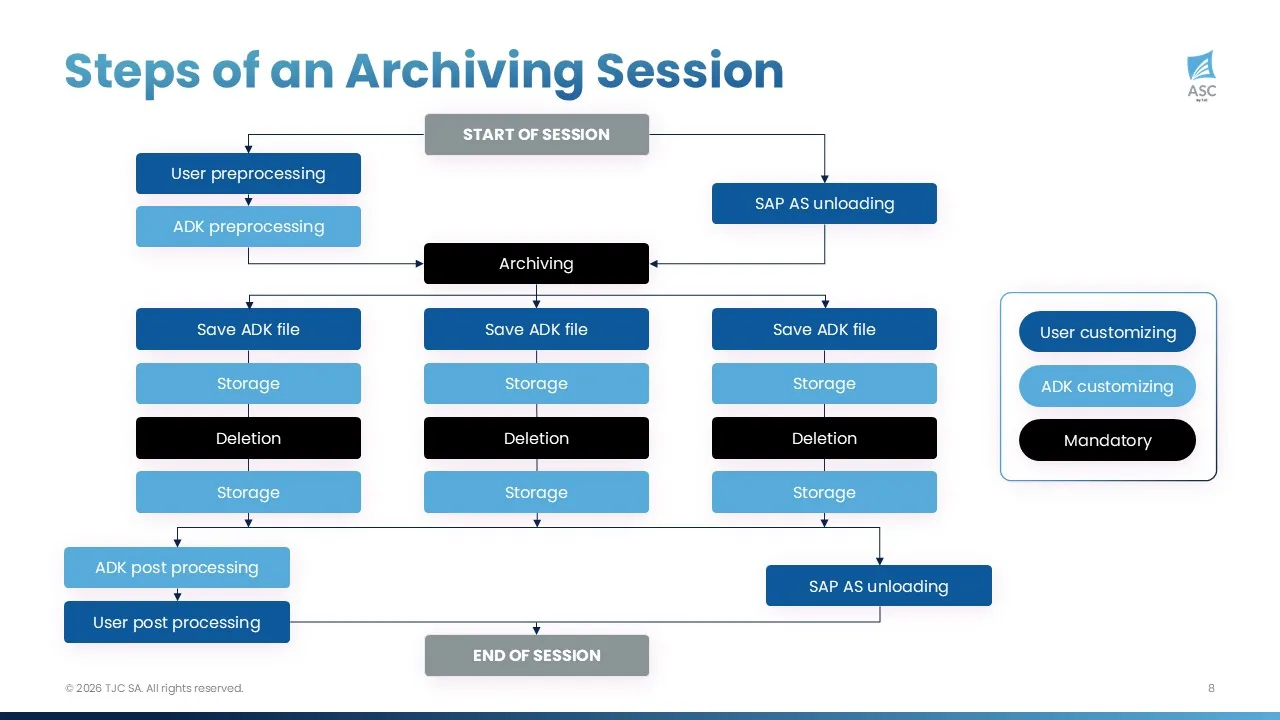
In short, an archiving session is a collection of interdependent jobs executed through several SAP archiving programs. Managing this process means handling exceptions at every stage — for example, what happens when an archiving job creates two archive files and then crashes? A third-party job scheduler has no awareness of this context. The Archiving Sessions Cockpit does.
Job scheduler tools do not inherently understand archiving logic, object dependencies, or retention constraints. In contrast, the ASC embeds business logic specific to SAP data archiving. It understands archiving object dependencies, retention and residence times, and ILM and destruction constraints.
The variant creation challenge
Variant creation is arguably the most critical — and most underestimated — aspect of productive data archiving. The quality and granularity of your variants directly affects archive file organisation, data accessibility, runtime performance, and your ability to handle organisational changes such as system splits or company divestments.
Why granular variants matter
Best practice dictates that archiving should be split by company code (or sales area, plant, etc.) and by discrete time periods (e.g. monthly). This approach delivers several advantages:
- Faster write jobs: With detailed variants, archiving write jobs execute faster because only the relevant periods are analysed.
- Faster data access: When a user needs to retrieve February invoices, only the February archive files are opened rather than the entire archive set.
- Organisational flexibility: If a company code is sold or a system is split, the relevant archive files can simply be moved. With generic variants, archive files contain mixed data from multiple company codes — and ADK files cannot be modified once created. This creates both technical headaches and serious data confidentiality issues.
- Audit readiness: Well-structured archiving notes with standard naming conventions make it immediately clear what data each archive file contains.
The problem with creating variants manually
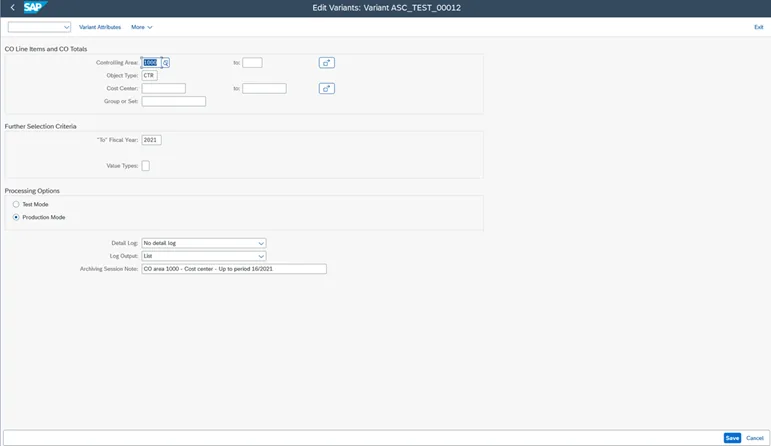
With a job scheduler, variants must be created manually for each archiving run. Consider the scale: if you archive 15 objects across 10 company codes on a monthly basis, that is 150 variants per month — 1,800 per year. Each variant must be created, verified, and linked to the correct job definition in the scheduler. Every month, the job definitions must be updated as new variants are created. And if you go into further detail while managing object/variant relationships, the number of jobs to synchronise can quickly reach into the thousands or even millions.
Manual creation at this scale inevitably leads to errors and delays. A mistyped fiscal period, an omitted company code, or an incorrect date range can result in business users losing access to recent data — or worse, archiving data that should not yet be archived. And because many archiving objects do not support a reload option, these errors can be irreversible.
For a comprehensive overview of SAP data archiving fundamentals, including processes and benefits, refer to our detailed guide.
What about TVARV?
In SAP, TVARV is a standard table used to store dynamic variable values for report variants. Some teams attempt to use TVARV entries or SAP variant variables to automate variant creation. However, this approach quickly reaches its limits.
Variant variables work with the current date, which means they cannot handle catch-up archiving for periods that were missed. They also struggle with objects selected by fiscal period, residence time, or number ranges rather than simple date criteria.
The following example illustrates some of the limitations of TVARV tables:

In this case, if the archiving job starts today and the ‘Created on’ field is selected, it will be filled with a date ranging from 01/11/2025 to 30/11/2025. But the dates are always calculated based on the current date. So, if archiving was paused between October and December 2025 and then restarted today, archiving jobs for August, September, and October would not be launched.
How the Archiving Sessions Cockpit handles variant creation
The ASC automatically generates all required variants based on its configuration. It manages three key fields — Object, Area, and Option — to produce purpose-built variants with the correct time periods, organisational splits, and technical parameters.
- Object defines the SAP archiving object.
- Area defines the organisational unit to archive (a company code or a sales area, for example).
- Option specifies technical elements relating to different parts of SAP, such as document types. For example, a billing document can be archived based on a billing type as defined in SAP customising — one billing type could be archived with a 6-month residence time and another with 24 months.
Object is a mandatory field, while Area and Option are optional.
Importantly, the archiving session note is populated automatically using a standard naming convention, eliminating the risk of manual error. Whether you need 24 archiving runs per year for a single object or hundreds of runs across dozens of objects, the ASC handles the complexity without additional effort.
Sweep archiving: where generic variants fall apart
Open items cannot be archived, and this happens more often than one might expect:
- When there are object dependencies — for example, object A cannot be archived until object B has been archived.
- Sometimes, certain processes take too long and cannot be completed within the permitted archiving windows.
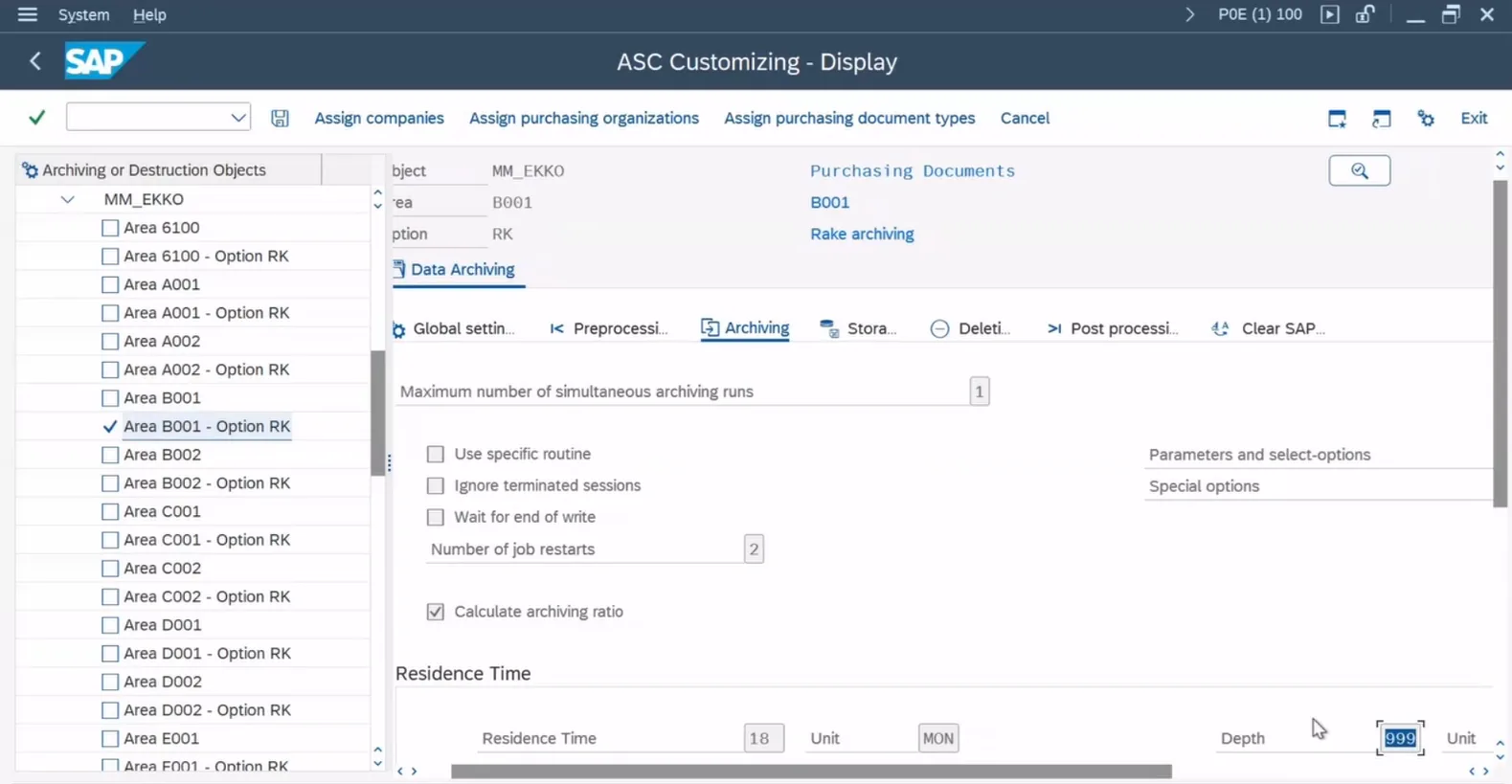
As a result, items that are still open when archiving starts will be excluded from the process. The technique “sweep archiving” (also called rake archiving) reviews all months from previous years to identify items that were previously open at the time regular archiving should have taken place, but have since been closed. Then, these newly eligible items are archived.
Sweep archiving can be configured in many ways: quarterly, yearly, running across the last five years or the last decade — the choice is yours.
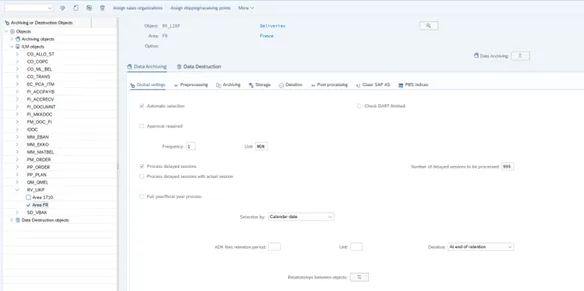
With the ASC, this process is simple and automated. By simply adjusting the settings, the ASC automatically performs a new “sweep”, evaluating the relevant data set once more without manual intervention. Conversely, a job scheduler will not perform this task because they simply do not have that logic embedded within them.
When does sweep archiving make sense?
Sweep archiving is particularly effective for improving archiving ratios and ensuring that eligible data is not left behind. At TJC Group, we begin with an in-depth analysis of the data. If the archiving ratio is too low, we investigate the possible causes — open processes, time gaps, and so on — and sweep archiving is applied where it makes sense.
It is especially valuable in preparation for cloud migrations, system carve-outs, or S/4HANA migrations, where organisations are under pressure to maximise archiving rates and minimise the volume of data carried into the new environment.
How the ASC handles sweep archiving
With the ASC, configuring sweep archiving is a matter of a few clicks. You update the global settings, define the time range and frequency, and the ASC takes care of everything else: creating new variants, rescheduling all jobs (pre-processing, write steps, delete steps, SAP AS Unloading, post-processing, and content server storage jobs). Everything is reprogrammed automatically. Technically, it is simply a new option configured for the selected archiving object. With a job scheduler, all of these steps would need to be performed manually.
The ASC also introduces a particularly useful concept: the depth of an archiving session. Imagine archiving purchase orders on a weekly basis, by document date. The depth in this case is 7 days. When some items are not closed within that window and cannot be archived, the depth can be extended to 14 days in the ASC, allowing it to look back two weeks. Some data may have become archivable in the second week. This level of configurability is simply not available with a job scheduler.
Real-world example: One of our customers, a medical company providing home-based medical assistance, faced a particularly complex invoicing process. Services are typically paid for by the French national health service or by health insurance providers, with a small remaining amount sometimes paid by the patient. As a result, invoice processing can take a long time, as several parties are involved before it can be completed. Our SAP consultants carried out an in-depth analysis of the data and identified a large number of open items that had been excluded from the initial archiving runs. Using the Archiving Sessions Cockpit, sweep archiving, and automated classical SAP data archiving, they were able to capture these newly eligible items, significantly increase the archived data volume, and improve the overall archiving ratio.
The problem with generic variants and job schedulers
Job schedulers use generic variants which do not include time-based selection criteria) and do not have the option to add “the depth” to an archiving session. As a result, several issues appear over time:
- Increasing runtimes: In year one, suppose 19 GB out of 20 GB is archived, leaving 1 GB. In year two, the archiving job re-evaluates all of year one’s remaining data plus year two’s data, even though most of year one’s data is no longer eligible. By year four, a monthly run for the most recent month still re-evaluates data from the previous 47 months. Runtimes grow progressively longer.
- Mixed archive files: When a portion of year one data eventually becomes archivable in year four, the resulting archive files contain a mix of year one and year four data. In transaction SARA, it becomes impossible to identify which data is stored in which file.
- Poor data access performance: If a user needs year one data, all archive files must be opened. With one archive file typically created per 200 MB, this can quickly mean thousands of files — leading to long transaction times and potential timeouts.
Managing dependencies between archiving objects
Some archiving objects must be processed in a specific order. A classic example: SD deliveries (object “RV_LIKP”) must be archived before sales orders (object “SD_VBAK”). In FI, the FI_DOCUMENT object may have a mandatory dependency on CO_TRANS, plus around a dozen optional relationships that improve the archiving ratio.
These dependencies exist at the variant level, not at the job level. To archive RV_LIKP files for January 2020, the corresponding SD_VBAK files for January 2020 must be archived first. In other words, the RV_LIKP archiving session can only start once the SD_VBAK archiving session for the same period has completed. Time-based dependencies also apply: for example, object A for June 2020 may depend on object B for July 2020 (a future dependency) or May 2020 (a past dependency).
How the ASC handles dependencies
With a job scheduler, dependencies between objects must be managed manually for every run. With the ASC, you define the dependencies once and everything else is handled automatically. The ASC also comes with predefined relationships between archiving objects that can be customised or extended.
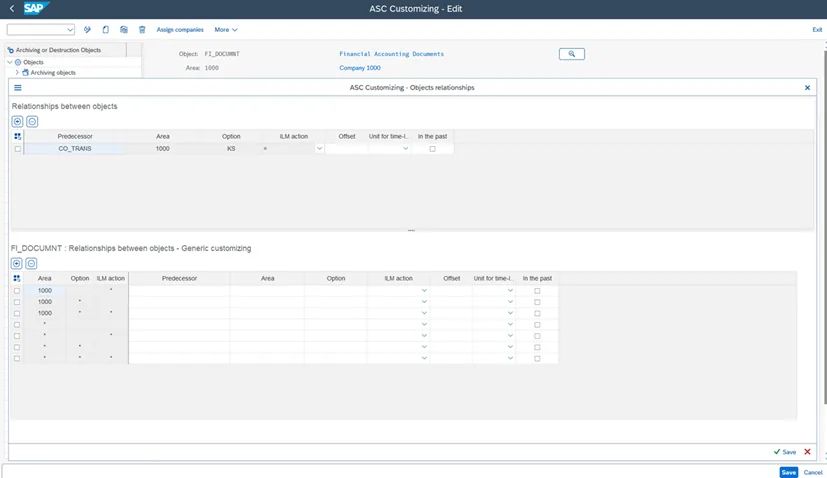
Dependencies are defined once in ASC customising and enforced automatically at execution time — including across SAP systems. When a new archiving object or organisational unit is added, ASC configuration takes minutes, not days. Customise once. Automate always.
Schedule optimisation and operational constraints
An optimised archiving schedule must archive the correct data, in the correct sequence, at the correct time, in the shortest possible time — without impacting normal business operations. This requires awareness of multiple constraints that a generic job scheduler simply cannot manage.
Time zones and global operations
For organisations with worldwide operations, archiving must respect regional business hours. If your system is US-based but you have a subsidiary in Singapore, you would run archiving for the US sales organisation during US nighttime and for the Singapore sales organisation during US daytime (Singapore nighttime). The ASC handles this through configurable archiving windows per area.
Prohibited time slots
Archiving should never run during fiscal year closing. Equally, if your sales centre experiences peak order volumes every Monday morning from 07:00 to 13:00, archiving for that sales organisation should be paused during those hours. The ASC allows you to define prohibited days, dates, and time slots in minutes — and enforces them automatically.
Parallel job management
The ASC automatically determines which archive jobs to run and optimises execution within defined parameters: allowed archiving windows, total number of parallel jobs, number of parallel jobs per object or job type, archiving frequency, and relationships between objects. It triggers standard SAP jobs in the correct sequence.
With a job scheduler, defining this level of optimisation manually across thousands of variants and jobs is impractical. The common result is that archiving takes far longer to complete, progress stalls, and the benefits of data volume reduction are delayed.
Catch-up archiving
When archiving has been paused — whether due to an audit, a system issue, or an organisational change — a backlog of overdue sessions accumulates. A catch-up exercise with a job scheduler means creating thousands of variants and jobs manually. The ASC automatically runs overdue sessions in chronological order, from oldest to latest, completing the catch-up in the shortest possible time and without additional effort.
Error recovery and session continuity
Archiving sessions can fail for many reasons: database locks, system outages, resource contention, or program errors. What matters is how quickly and safely the process recovers.
The job scheduler approach
With a job scheduler, a failed job requires manual investigation to determine the exact point of failure. The administrator must identify which archive files were successfully created, which deletion jobs completed, and where the process should restart — all to prevent data loss or orphaned archive files. This is time-consuming and error-prone.
The Archiving Sessions Cockpit approach
The ASC automatically re-runs failed jobs from the correct point, preventing any loss of data. The number of retry attempts is configurable per job type and archiving object. Internal ASC tables are continuously updated with job statuses, so the tool always knows exactly where to resume. If archiving needs to be stopped entirely, a single transaction immediately halts all new sessions. When archiving is permitted to restart, the ASC picks up precisely where it left off.
Guaranteed archive file backup
The ASC can perform a backup of archive files to a specified location before the DELETE job runs to physically remove data from the database. It will not start the deletion job until the backup has completed successfully — guaranteeing the security of archive files before physical deletion. This is simply not achievable with a job scheduler. Building a delay between STORE and DELETE is an option, but it does not guarantee that the backup has actually completed.
Monitoring, reporting, and continuous Improvement
Archive Ratio reporting
The Archiving Sessions Cockpit provides an “archive ratio” for each session: the percentage of data archived relative to the data selected for archiving. This metric enables analysis by exception — you only investigate sessions where the archiving ratio falls below a defined threshold, such as 95%. Manual effort is therefore directed precisely where it is needed.
Without the ASC, this reporting does not exist. Every object must be analysed manually, which is neither scalable nor sustainable. TJC Group’s ongoing archiving services leverage these KPIs to monitor results continuously and adjust ASC customising or run targeted sweep archiving when scope changes occur.
Additionally, the ASC displays all ADK sessions that have successfully completed in the system, with or without the ASC.
Blocking and unblocking
If archiving for a specific object or company code must be suspended — due to an audit, a data issue, or a business request — the ASC provides a single transaction to block and unblock immediately or from a future date. The rest of the archiving schedule continues unaffected. With a job scheduler, stopping archiving for one company code typically means stopping the entire schedule if variants are not split by company code. And once archiving stops, obtaining approval to restart is often a lengthy process that can stretch into months — or even years.
Real-world scenarios: what can go wrong
These examples come from real organisations that executed successful archiving projects with experienced consultants and competent internal teams — yet still encountered issues that only purpose-built automation could have prevented.
Scenario 1: Finding archived sales invoices. A retail company with a 2 TB database archived several SD-related objects. Without structured archiving notes, they had no way of knowing which archived data was stored in which archive file. Accessing specific SD transactions required opening all archive files via sequential read — an extremely slow process. With the ASC, every archive file is clearly documented with area, option, and time period, making targeted data access straightforward.
Scenario 2: Gaps in the archiving schedule. In one case, IDOC archiving showed data archived from 2020 onwards, but a gap existed from 2017 to early 2020 where no archiving had taken place. In another, sales invoice archiving (SD_VBRK) ran for years, but a company code that was active from 2011 and later sold in 2016 was never included in scope. Neither gap was detected because no monitoring or KPI tracking was in place.
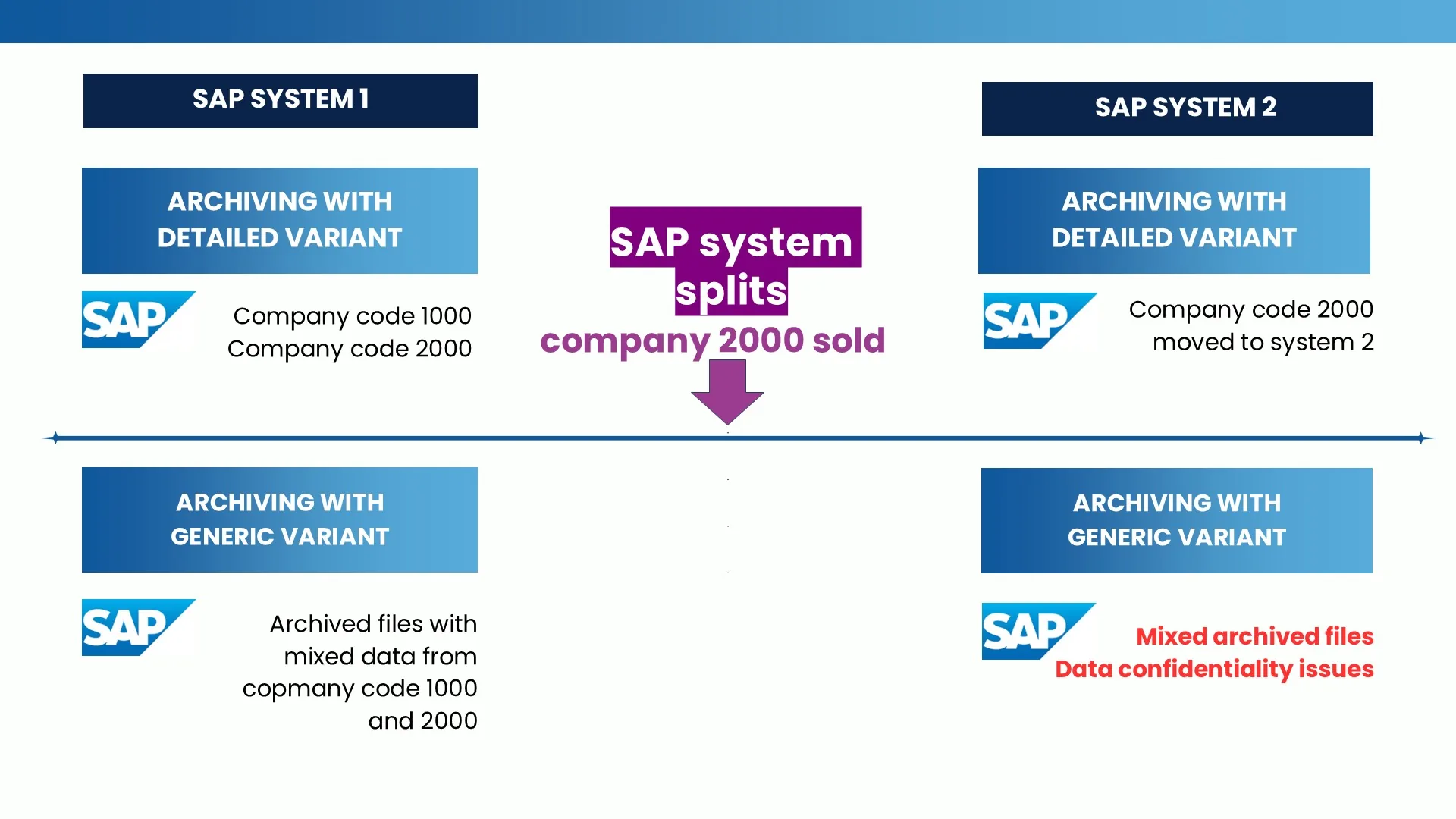
Scenario 3: System splits. Consider an organisation with two entities — company code 1000 and company code 2000 — where company code 2000 is subsequently sold. If company-specific variants have been used to archive accounting data, the required action is straightforward: the relevant archive files can simply be moved from the file system or content server to another environment. By contrast, when a job scheduler uses generic variants, the resulting archive files may contain mixed data from multiple company codes. Since archive files cannot be modified and reloading them is nearly impossible, this situation leads to significant technical challenges as well as serious data confidentiality issues — particularly when company divestments are involved.
ASC vs Job Scheduler: summary comparison
| Capability | Archiving Sessions Cockpit (ASC) | Third-Party Job Scheduler |
|---|---|---|
| Variant creation | Automatic, based on ASC configuration. Supports split by company/country, monthly periods, and options. Archiving notes maintained automatically. | Manual. Hundreds of variants per month. Error-prone, requires continuous updating of job definitions. |
| Schedule protection | Archiving for one company/country can be blocked without affecting the rest. Single transaction to block/unblock. | If not split by company/country, one issue stops the entire schedule. Manual changes required. |
| Archive file backup before DELETE | ASC performs backup and will not start DELETE until backup completes. Guaranteed data security. | Not achievable. A delay between STORE and DELETE does not guarantee backup completion. |
| Schedule optimisation | Automatic: archiving windows, prohibited slots, parallel job limits, frequencies, object relationships, correct sequencing. | Manual definition. Hundreds of jobs per month. Commonly stalls or runs extremely slowly. |
| Catch-up archiving | Automatic. Runs overdue sessions chronologically. Completes in shortest possible time. | Thousands of variants and jobs to create manually. Extremely slow progress. |
| Error recovery | Automatic re-run from correct failure point. Configurable retry attempts per job type/object. | Manual investigation required to determine restart point. Risk of data loss. |
| Stop/restart | Immediate stop via single transaction. Automatic restart from correct point. | Manual schedule changes for stop and restart. Management often orders a stop but fails to order a restart. |
| Archive ratio reporting | Built-in. Analysis by exception (e.g. ratio < 95%). Effort focused on problem areas. | Not available. All objects must be analysed manually. |
| Sweep archiving | Controlled: enable sweep option, ASC builds selection logic and documents in notes. | Generic variants lead to mixed files, increasing runtimes, and poor data traceability. |
| Dependencies | Defined once in customising. Enforced automatically, including cross-system. | Manual tracking across hundreds of variant-level dependencies. Quickly unmanageable. |
| Adding new objects/company codes | Minutes to configure. ASC handles scheduling and execution. | Extensive rescheduling. Risk of breaking existing schedule. |
Key takeaways
- SAP data archiving is not a simple scheduling problem. The interdependencies between jobs, the need for granular variants, the complexity of fiscal calendars, and the risk of irreversible errors make it one of the most demanding processes to automate correctly. A generic job scheduler was never designed for this.
- Well-detailed variants are the foundation. The quality of your variants determines data accessibility, runtime performance, audit readiness, and your ability to handle organisational changes. Automating variant creation with the ASC eliminates the single largest source of manual effort and error.
- Automation is not optional. Creating and maintaining thousands of variants manually is impractical, inefficient, and error-prone. The Archiving Sessions Cockpit removes that burden entirely. Configure once, automate always. It runs as a background process, smoothly and reliably, getting the job done in the most efficient way possible.
- Job schedulers lack archiving and business logic. Job schedulers schedule jobs. That is all they do. They lack the intelligence and context required to manage the full complexity of SAP data archiving.
- Generic variants generate inaccurate archive files. They may appear simpler in the short term, but they lead to progressively longer runtimes, mixed archive files, poor data traceability, and user frustration. The ASC’s purpose-built variants avoid this entirely.
- Monitoring is not optional. Without archive ratio reporting and KPI tracking, gaps in your archiving schedule will go undetected for years. The ASC’s built-in reporting ensures continuous visibility and improvement.
- Purpose-built automation pays for itself. Customers using the ASC consistently achieve archiving ratios above 95%, complete catch-up phases faster, and maintain their archiving schedules without interruption. The reduction in manual effort, error remediation, and operational risk delivers measurable ROI.
Conclusion
A job scheduler is a generalist tool. The Archiving Sessions Cockpit is a specialist. It transforms SAP data archiving from a labour-intensive technical task into an intelligent, automated process. By handling the complexity of variants, archiving notes, and object dependencies, the ASC enables our clients to consistently reach archiving ratios of 95% or higher while significantly reducing their total cost of ownership.
If your organisation is managing archiving with a job scheduler — or struggling to maintain a consistent archiving schedule — contact TJC Group to discover how the Archiving Sessions Cockpit can transform your archiving operations.
Q1. What are the main differences between the ASC and a job scheduler when it comes to data archiving?
Answer:
The fundamental difference is one of purpose. A job scheduler is a generalist tool — it schedules and triggers jobs, but has no understanding of what those jobs do or how they relate to one another. The Archiving Sessions Cockpit is built specifically for SAP data archiving. It understands archiving objects, retention and residence times, object dependencies, ILM constraints, and the correct sequencing of every step in an archiving session. Where a job scheduler simply fires jobs, the ASC manages the entire process intelligently.
In practical terms, this means the ASC automatically generates all required variants, enforces dependencies between archiving objects, handles sweep archiving and catch-up phases, recovers failed sessions from the correct point, and guarantees that archive files are backed up before any data is physically deleted — none of which a job scheduler can do. On top of this, the ASC provides built-in archive ratio reporting, enabling continuous monitoring and improvement without the need to manually review every archiving object.
In short, a job scheduler can run archiving jobs. The Archiving Sessions Cockpit manages the entire archiving programme — intelligently, automatically, and at scale
Q2. Can I use my existing job scheduler to manage SAP data archiving?
Answer:
Technically, yes, but generic job schedulers were not designed with SAP archiving logic in mind. They have no awareness of archiving object dependencies, retention and residence times, or ILM and destruction constraints. Managing archiving at scale with a job scheduler requires the manual creation and maintenance of thousands of variants and job definitions each month, which is both error-prone and unsustainable. The Archiving Sessions Cockpit embeds the business logic specific to SAP data archiving, automating what a job scheduler simply cannot.
Q3. Why does variant granularity matter, and how does the ASC manage it?
Answer:
The granularity of your archiving variants directly impacts runtime performance, data accessibility, audit readiness, and your ability to handle organisational changes such as system splits or company divestments. Best practice requires variants split by company code and discrete time periods — which, at scale, can mean 1,800 or more variants per year for a single object set. The ASC generates all required variants automatically based on its configuration, populates archiving session notes using a standard naming convention, and eliminates the risk of manual errors that can lead to irreversible data loss.