



Author: Vivien Rivoalen, Developer at TJC Group Co-author: François Beudin, SAP Archiving Consultant at TJC Group
Generating an SAP DART extract from archived data can be challenging, especially when organisations need to regenerate files for a tax audit after data archiving has already taken place. In this article, TJC Group demonstrates how the Archiving Sessions Cockpit (ASC) helps SAP teams identify the right archive files quickly through consistent and automated archive notes.
In this article, based on a real customer example, we will show how the ASC archive notes helped reduce archive file selection to less than 1% of all available archive files when generating a DART extract for Germany.
Table of contents
- Why archive notes matter: simplifying SAP DART extracts
- The challenge: finding the right archive files
- Why DART extraction becomes more complex after archiving
- The solution: automated archive notes with ASC
- A real-life DART example
- Beyond DART: additional business benefits
- A small feature with a big impact
- Need help with SAP DART extract and tax compliance in SAP?
Why archive notes matter: simplifying SAP DART extracts
SAP data archiving is often viewed as a technical housekeeping activity. Archive the data, reduce database growth, improve system performance and move on. But what happens years later when someone needs to access archived information?
A tax auditor requests an SAP DART extract. A business unit is being sold. A retention period expires and archive files need to be removed. Suddenly, one simple question becomes surprisingly difficult: which archive file contains the data we need?
The challenge: finding the right archive files
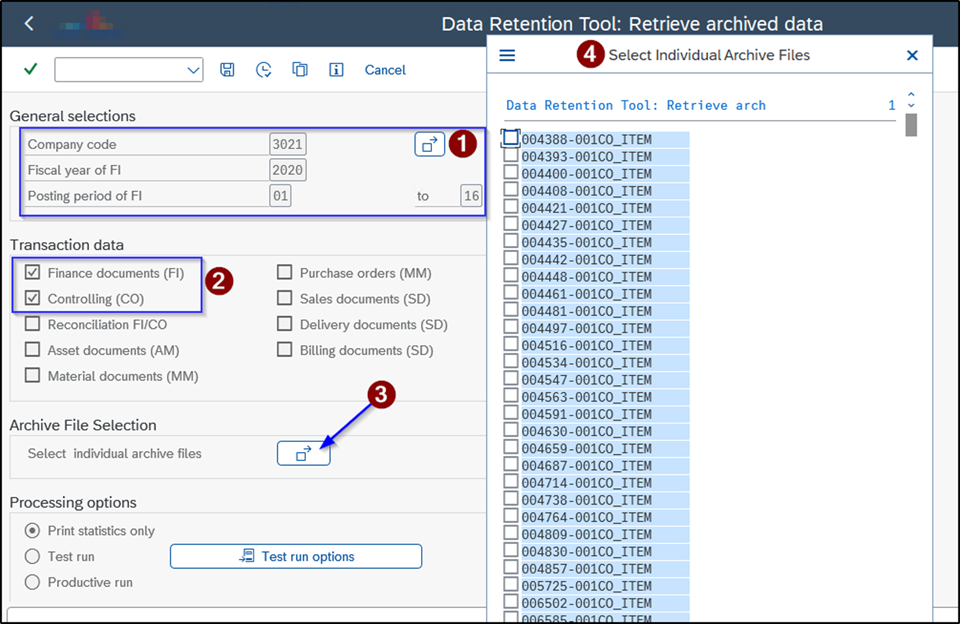
When generating an SAP DART extract from archived data, identifying the correct archive files is critical. In theory, this sounds straightforward. In practice, it can be extremely time-consuming.
If the data has already been archived, SAP users must determine which archive sessions contain the required company code, fiscal year or business area. Selecting too many archive files can dramatically increase processing times.
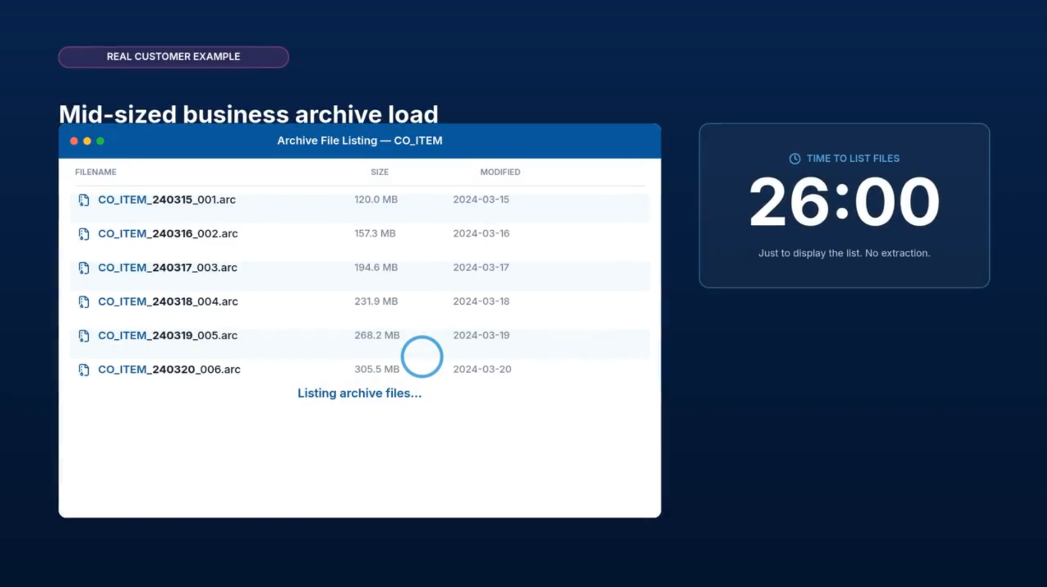
In a real customer example, it took 26 minutes simply to display the list of available archive files. No data extraction. No processing. Just listing the files.
The challenge becomes even greater when organisations need to regenerate a DART extract for a tax audit years after the original extraction should have taken place.
Without a clear way to identify the relevant archive sessions, users may have to analyse multiple archive files manually before finding the information they need.
Watch this video to discover how ASC archive notes can help simplify SAP DART extraction and improve access to archived SAP data.
Why DART extraction becomes more complex after archiving
As you may know, the DART (Data Retention Tool) was conceived to help SAP users comply with legal data retention obligations for tax and audit purposes. The DART extract is widely used to extract financial and transactional data for tax authorities and auditors, particularly in countries such as Germany.
When archived data is involved, the DART process requires users to select the archive files that contain the required information.
- Selecting too few files may result in missing data.
- Selecting too many files may significantly increase processing times and, in some cases, cause the extraction process to become impractical.
The real challenge is not finding archive files. The real struggle is identifying which archive files actually contain the relevant data.
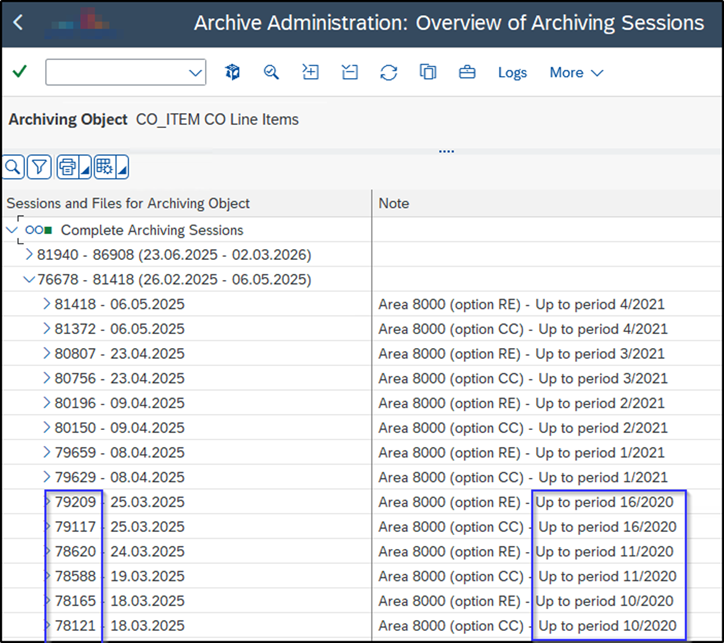
When reading archive files, SAP needs to define which archive files should be opened. Therefore, you need a way to identify what data is contained in an archive file and what is not. SAP archiving statistics enable this, but on other occasions, you have to manually select files to open. In such cases, reading the archiving note is one approach, but only if archiving notes have always been filled in consistently.
Here is where the archive notes, created automatically by the ASC, make a real difference.
The solution: automated archive notes with ASC
The Archiving Sessions Cockpit addresses this challenge through one simple but powerful feature: automated archive notes. Instead of relying on users to enter archive descriptions manually, ASC automatically populates the archive note field whenever an archive session is created.
What is an archiving note?
An archiving note is a text description attached to each archiving session. When archiving is carried out manually, this text is also entered by hand, often resulting in inconsistent or blank notes over time. With ASC, customising ensures this text is automatically populated with relevant details (e.g., “company code 1000, January 2015”). This allows for optimised data segregation and ensures you know exactly which archive files to open or skip, which is critical when accessing archives or removing older files.
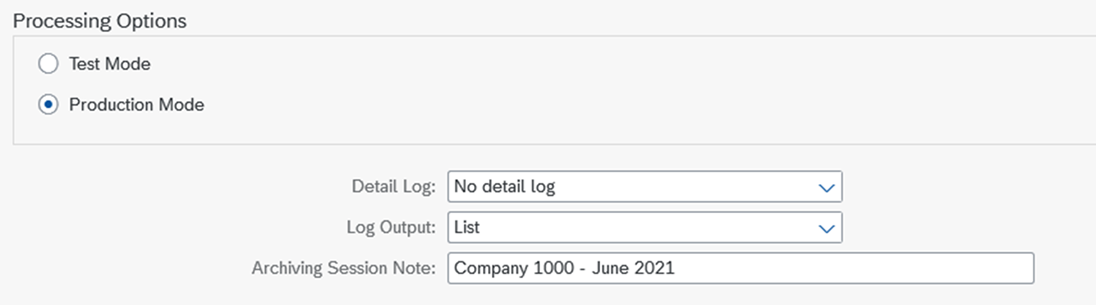
Depending on the archiving scenario, archive notes can include information such as:
- Company code
- Area
- Fiscal period
- Fiscal year
- Country
- Organisational unit
- Other business-relevant selection criteria
As a result, users can immediately understand what data is contained within an archive file without having to open and analyse it.
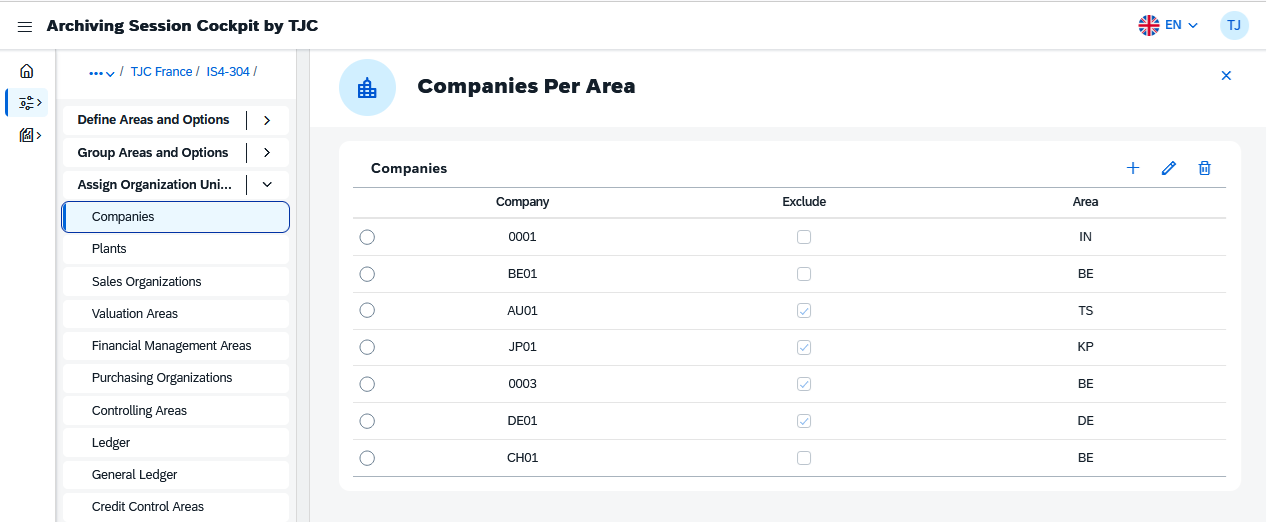
Consistency matters
In many SAP systems, archive notes are entered manually. This often leads to inconsistent naming conventions, incomplete information or missing notes altogether.
One administrator may record detailed information. Another may use abbreviations. A third may leave the field empty. Years later, finding the right archive file becomes a detective exercise.
ASC eliminates this inconsistency by automatically generating archive notes according to predefined business rules.
The result is a standardised archive landscape that remains understandable long after the original archiving project has been completed.
A real-life DART example
A customer needed to generate a DART extract for Germany for fiscal year 2020.
Using ASC archive notes, the team could quickly identify which archive sessions were relevant by reviewing information such as the company code, business area and fiscal period.
Because Germany represented only around 4% of the organisation’s business, and because archive files that did not contain fiscal year 2020 data could be excluded, the selection was reduced to less than 1% of all available archive files.
This significantly reduced the effort required to generate the DART extract and avoided unnecessary processing of irrelevant archive data.
Beyond DART: additional business benefits
Although this use case focuses on DART extraction, archive notes provide value in many other situations.
Supporting carve-outs and divestitures
When an organisation sells a subsidiary, business unit or organisational area, it must determine which historical data belongs to the buyer and which data remains with the seller. Consistent archive notes make it easier to identify archive files associated with specific company codes, sales organisations or business areas.
Let’s illustrate this with an example: imagine an organisation split into two (divestment). The Archiving Sessions Cockpit will automatically include an “S” for system split in the archive note to identify this change quickly.

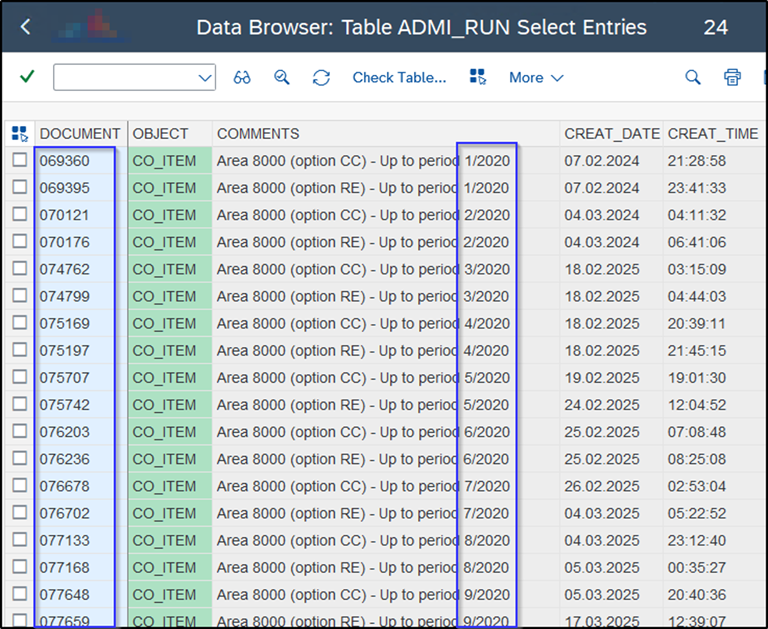
When the archiving note is filled in manually, there is often a lack of consistency in the naming convention, to the point where important information is missing or the note is left blank entirely, as shown in the image below:

As a result, if SAP teams want to find an invoice from a specific date, the user will have to open many files and verify them to find the right one. Naturally, this will affect system performance and take a considerable amount of time.
Simplifying data destruction projects
Archive notes can also support data destruction and retention management initiatives. If specific organisational areas are no longer required, clearly labelled archive files make it easier to identify which files should be reviewed for removal, while ensuring compliance with corporate governance rules.
Improving archive storage management
Many organisations periodically review old archive files to reduce storage costs.
When archive notes clearly indicate the period covered by an archive session, teams can more easily identify files that may have exceeded retention requirements and are candidates for removal, subject to legal and business approval.
A small feature with a big impact
Archive notes may seem like a minor detail within a broader SAP data archiving strategy.
However, they often become one of the most valuable pieces of information years after the archive files have been created.
By automatically generating structured and meaningful archive notes, the ASC improves traceability, simplifies archive file selection and helps organisations access archived information more efficiently.
Whether you are generating a DART extract, managing a carve-out project, reviewing retention periods or simply trying to find the right archive file, clear archive notes can make all the difference.
The following table summarises the business benefits of archive notes for SAP DART extracts:
| Benefit | Description |
| Reduce archive file selection | Quickly identify relevant archive sessions and avoid processing unnecessary archive files. |
| Improve audit readiness | Simplify the retrieval of archived financial data required for tax audits and regulatory requests. |
| Save time and resources | Reduce manual effort spent analysing archive sessions and searching for relevant archived data. |
| Improve archiving governance | Ensure archive notes are generated consistently and contain meaningful business information. |
Need help with SAP DART extract and tax compliance in SAP?
Generating DART extracts is just one aspect of SAP tax and audit compliance. Over the years, TJC Group has helped organisations around the world prepare, extract and deliver the data required by tax authorities and auditors, even in complex SAP landscapes with large volumes of archived data.
Our team combines deep expertise in SAP data archiving, data extraction and compliance reporting with SAP-certified software solutions designed to simplify these processes. From the Audit Extraction Cockpit (AEC), which streamlines tax and audit data extraction, to the DART Sessions Cockpit (DSC), which automates and schedules DART runs, TJC Group helps organisations reduce manual effort, improve compliance and ensure critical data is always available when needed.
With DSC, organisations can automate, pre-schedule and monitor DART extraction processes, ensuring reports are generated consistently and on time, without relying on manual intervention. The ASC and DSC are integrated, which means the ASC will not archive data related to a DART extract until the DART process has been successfully completed by DSC.
Whether you need support with a specific tax audit, a recurring compliance requirement or a broader SAP data management strategy, we are here to help SAP teams be audit-ready.
Q1. What is SAP DART and why is it important for tax compliance?
Answer:
SAP DART (Data Retention Tool) is a tool designed to help SAP users extract financial and transactional data to meet legal data retention obligations for tax and audit purposes. It is particularly important in countries such as Germany, where tax authorities require organisations to provide structured data extracts upon request. Ensuring DART extracts are generated accurately and efficiently is a key part of maintaining tax compliance.
Q2. How do archive notes help when generating a DART extract from archived data?
Answer:
Archive notes provide a text description attached to each archiving session, indicating details such as the company code, fiscal year and business area contained in the archive file. When generating a DART extract, these notes allow SAP teams to quickly identify which archive files are relevant, avoiding the need to open and analyse files individually. This can dramatically reduce processing time and effort.
Q3. What is the Archiving Sessions Cockpit (ASC) and how does it automate archive notes?
Answer:
The Archiving Sessions Cockpit (ASC) is an SAP-certified tool developed by TJC Group that automates and manages SAP data archiving processes. One of its key features is the automatic generation of archive notes whenever an archiving session is created. By populating notes with predefined business-relevant information (such as company code, fiscal period and country), ASC ensures consistency and eliminates the risk of blank or incomplete notes.
Q4. Can archive notes be useful beyond SAP DART extracts?
Answer:
Yes. While archive notes are extremely valuable for DART extracts, they also support other business scenarios. These include carve-outs and divestitures (identifying data belonging to a specific business unit), retention management (determining which archive files have exceeded their retention period) and archive storage optimisation (reviewing old files to reduce storage costs). Consistent archive notes improve traceability and governance across the entire archive landscape.