


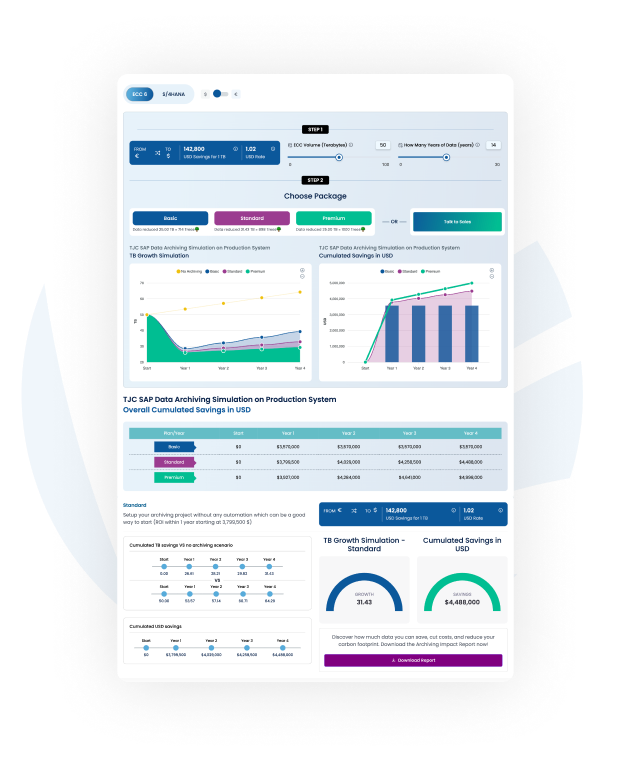
Calculate the savings of your data archiving project
Find out how much storage space you can save and how this translates into financial savings in SAP ECC and SAP S/4HANA.
Home » SAP Data Archiving
Find out how much storage space you can save and how this translates into financial savings in SAP ECC and SAP S/4HANA.
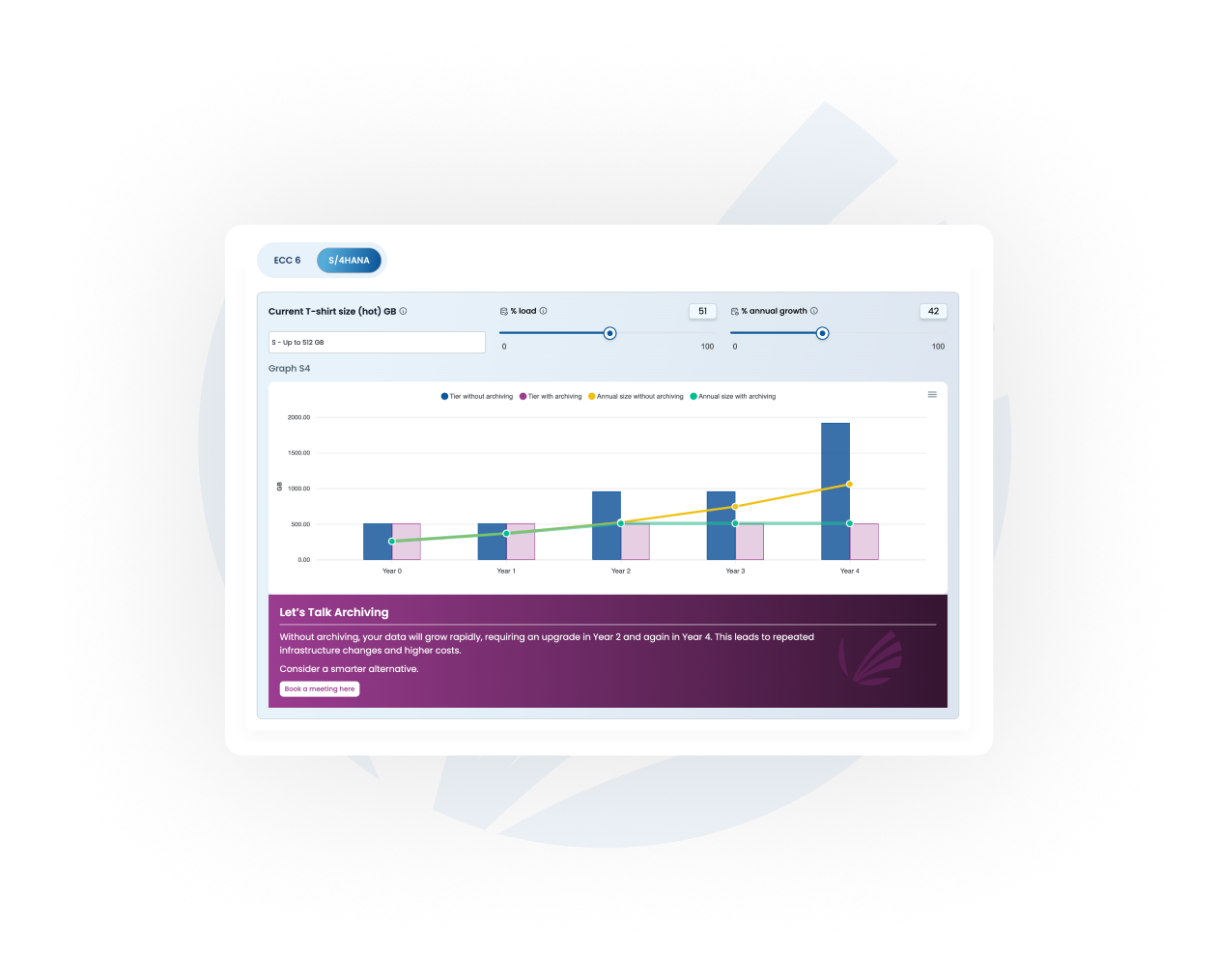
Find out how much storage space you can save and how this translates into financial savings in SAP ECC and SAP S/4HANA.
Find out how much storage space you can save and how this translates into financial savings in SAP ECC and SAP S/4HANA.
BASIC
Ideal for
STANDARD
Ideal for
PREMIUM
Ideal for
Reduce database volumes and optimise memory usage with TJC Group automated data archiving services. SAP Data Archiving enables consistent, secure, and thorough removal of business-complete application data from the database while preserving it for future use and compliance. We will empower your team to have control over the SAP Database size and growth to quickly reduce the storage and IT maintenance costs.


Cut storage costs. Put a lid on data volume growth and reduce the cost associated with storing large volumes of unnecessary data.

Ensure compliance. Stay updated with data privacy laws or tax and audit requirements by retaining or deleting personal information in a tax archive format

Make the right-size move to S/4HANA. Archive old data such as old company codes, that does not need to be migrated into the new system but must be retained for compliance.

Reduce migration times.Typically, the time window to conduct a migration to a new server or cloud are very short. The more data, the longer the migration times

Improve SAP system performance. A lighter system will result in quicker backup times and a better use of IT resources.

Lower the carbon footprint. Less data means less energy is used to store it, contributing to the organisation's sustainability goals.
Trying to do data archiving without that is almost like trying to put somebody on a hamster wheel. It’s hard work! Automate SAP Data Archiving jobs with the Archiving Sessions Cockpit, and add-on SAP Certified solution.
Discover why archiving-native automation outperforms a general-purpose scheduler in complex SAP environments.
Book a Demo
Pre-processing, write, and post-processing jobs across objects
Automatically creates all required variants from ASC customising.
Variants must be created manually. Hundreds per month in large environments. Error-prone and time-consuming.
Split archiving so one region's issue does not stall the whole schedule
Built-in. If one entity is suspended due to an audit or issue, archiving continues for all others.
No native support. One company's issue can stop the entire schedule. Restarting approval is often difficult.
Ensure archive files are backed up before the DELETE job physically removes data from the database
ASC backs up archive files and will not trigger the DELETE job until backup completes successfully.
Not possible to guarantee. Scheduling a delay between STORE and DELETE does not confirm backup completion.
Run the right jobs, in the right sequence, at the right time. Without touching normal system operations.
ASC respects archiving windows, prohibited dates, parallel job limits, object relationships, and frequency settings automatically.
Manual schedule definition with hundreds of monthly variants. Archiving takes far longer. Benefits are delayed.
Complete a backlog of overdue sessions as fast as possible without disrupting live operations
Automatically runs overdue sessions in chronological order, oldest to latest. No manual sequencing required.
Catch-up means thousands of variants and thousands of jobs to manage manually. Archiving commonly stalls.
Resume an interrupted archive session from the correct point without data loss
Automatically restarts a new archiving session in the event of an interruption. The new archiving session will start after the first one is completed. Retry count is configurable per job type and archive object.
Requires manual intervention to identify the correct restart point. Risk of redundant archiving if not handled carefully.
Restart cancelled jobs until the session is complete.
Automatically re-runs failed jobs until the job ends successfully. Incomplete sessions remain in the work list as long as these jobs have not ended successfully. Retry count is configurable per job type and archive object.
Requires manual intervention to restart the jobs. Risk of incomplete archiving sessions: sessions with archive files not stored or not completely deleted.
Pause archiving for a specific object or entity, immediately or from a future date
Single transaction to block or unblock. ASC tracks job statuses and resumes from exactly the right point.
Requires manual changes to the schedule for both stop and restart.
Track how much of the selected data was actually archived per session — and surface exceptions automatically
Built-in report shows archive ratio per session. Flags underperforming sessions (e.g. below 95%) for targeted review.
No equivalent reporting. Every object must be reviewed manually to identify issues.
Avoid starting an archiving run for a given fiscal year before all legal or fiscal reports/extracts are issued.
Approval request emails are sent automatically by ASC to the FI manager. The archiving session can start once the FI manager approves it in the ASC tool.
Manual validation request before scheduling the job.
Stop manual variants. Discover ASC in your SAP environment.
Get a Custom DemoOur methodology stands apart

We will perform a comprehensive analysis of the SAP system, concentrating on data, documents, and fiscal aspects. Both the customer's technical team and business users will participate in this process. You will gain a clear understanding of the current data volume status of your system, including quick wins, insights into expected future data growth and its rate, opportunities for archiving projects, and a variety of recommendations to optimise storage.

After conducting initial assessments, we prepare a detailed report outlining a step-by-step action plan designed to meet our clients' needs effectively. This plan includes the most effective approaches, key metrics and measures, deliverables and timelines, as well as the expected return on investment (ROI) for the archiving project.

The implementation phase of the archiving project is a practical approach that ensures archiving activities run smoothly while meeting necessary prerequisites. Our goal is to achieve an archiving ratio of 95% or higher. In addition, we prioritise generating archived files in a way that allows for easy access when needed and supports future data retrieval.

Once the archiving project has been set up, our experts will manage the day-to-day archiving tasks, ensuring the SAP system operates optimally and archiving is never overlooked. This involves running regular data archiving jobs, performing regular health checks, handling errors and troubleshooting, analysing database growth, and providing further recommendations.










Want to learn in-depth about data archiving, the process, archiving objects, and more? We have just the right blog for you! No matter where you are in the archiving journey, this article will give you the keys to get started with a data archiving project in SAP.
These hidden inefficiencies are costing your business time, money, and compliance.
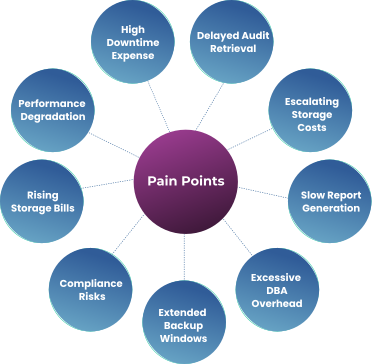
“Every hour of unplanned SAP downtime costs roughly €10 000 in lost productivity and support fees.”
“Retrieving archived transactions for compliance audits can take 48 hours, risking missed regulatory deadlines.”
“At 25 % annual data growth, you’ll need an extra €150 000 in hardware each year just to keep pace.”
“Critical management reports stall for as long as 90 minutes (vs. a 30 minute SLA), holding up decision-making.”
“Database administrators spend over 240 hours/year manually managing archiving runs—time better spent on strategic initiatives.”
“Your monthly full‐system backup now takes 14 hours, delaying end-of-month financial close by up to 2 business days.”
“GDPR fines up to €20 million for improper data retention.”
“€3,000 – €5,000 per TB/year on average for primary SAP HANA storage without archiving”
“60% of SAP slowdowns stem from unarchived legacy data.”

Use our free SAP Data Archiving Calculator to discover your potential cost savings in minutes.

Eliminate manual intervention by automating scheduling, execution, monitoring, and validation of archiving runs.

Reduce database size significantly before migration to streamline the transition and lower project timelines.

Archive or delete personal and sensitive data in line with local regulations using built-in compliance tools.

Free up valuable system resources by removing business-critical data without compromising access or auditability.

Gain real-time visibility of all archiving jobs with automated error handling, retries, and performance logs.

Seamlessly integrates with SAP ECC and S/4HANA environments—proven, secure, and officially certified.

“BT Group partnership with TJC Group has been very useful to us as TJC brings a tremendous amount of knowledge about Data Archiving to supplement our teams. Automation is the big win. Automating the process with the
While SAP data archiving is one of the most sought-after methods of managing the ever-growing volumes of data, there are a few challenges that organisations face with the process. A few of them are – identifying which data to archive as you may feel that everything is important, when in reality it’s not. Then comes the archiving misconceptions to tackle with – the biggest one being archiving is a numbered job. Bear in mind, the process is not simple, and it is definitely not done in just a few days. Apart from this, loss of access and data quality are two other common challenges faced during the SAP data archiving projects.
As mentioned, SAP data archiving is a preferred data management method. So yes, there are several case studies on archiving in SAP systems. You can read about our case studies here – https://www.tjc-group.com/resource-category/case-study/
An archiving object is a central component of data archiving, specifying precisely the data to be archived and how it should be done. Simply put, archiving objects tells your systems when to write, delete, or retrieve any module. As for different types of SAP archiving objects, there are two primary types – technical objects and functional objects. However, there are archiving objects based on the various SAP modules too like, FICO, SD, MM, CRM, Sol Man, and so on.
The key benefits that organisations can leverage after implementing SAP data archiving are as follows –
To develop a bullet-proof data archiving strategy for your SAP systems, the first step is to define clear objectives as per your business needs. Next, identify the data you want to archive as per their types, and set archiving timelines. However, keep in mind that the timelines must align with your organisational needs and regulatory compliance requirements. Additionally, when developing an SAP data archiving strategy for your systems, employ the following criteria –

Mandates worldwide with SAP Document and Reporting Compliance.
Minimise risk & stay compliant with system decommissioning.
Manage risk & tax compliance effectively with us.
Remove obsolete data & make S/4HANA migration easy.
Manage your documents easily through their lifecycle.
Ensure compliance without compromising on data security.
Remain GDPR compliant by controlling & deleting unnecessary data