



Author: Christopher Bicknell, SAP Data Archiving/ILM Consultant at TJC Group
SAP data archiving is often treated as a routine task, but for SAP Basis teams, managing it manually can become a time-consuming part of day-to-day operations. Creating variants, monitoring jobs, dealing with failures and working within limited archiving windows can quickly add up. This article looks at the practical challenges of manual archiving and how automating of data archiving jobs can help Basis teams reduce repetitive work, improve accuracy, keep data volumes under control and make better use of their time.
Table of contents
- The hidden cost of manual SAP data archiving
- Pain point 1: System performance degradation from oversized tables
- Pain point 2: Too much repetitive manual monitoring and administration
- Pain point 3: Archiving job failures and error-correction nightmares
- Pain point 4: Backup, refresh, and maintenance windows under pressure
- Pain point 5: HANA memory cost pressure and uncontrolled data growth
- Pain point 6: No monitoring or visibility across archiving sessions
- How the Archiving Sessions Cockpit (ASC) solves these problems
- Conclusion
The hidden cost of manual SAP data archiving
SAP Basis administrators, DBAs or technical leads monitor dozens of transactions every day, troubleshoot performance issues, manage backups that stretch into the early hours, and somehow still find time to run archiving jobs manually through SARA. Every additional year of transactional data increases the volume that SAP teams must manage, monitor, back up and ultimately archive, and the pressure to keep system performance up has never been higher, particularly in SAP S/4HANA, where high-volume tables grow relentlessly and HANA memory costs punish every unnecessary gigabyte.
When daily operational incidents compete for attention, archiving is often postponed or run inconsistently. The database keeps growing, and the business later pays through longer jobs, slower reporting and larger maintenance windows. In short, the one activity that could ease the burden stays manual, repetitive and easily forgotten. It does not have to be this way: data archiving can be automated in a secure and compliant way with the Archiving Sessions Cockpit (ASC). This article looks at six practical pain points of manual archiving and how automating archiving sessions helps Basis teams reduce repetitive work, keep data volumes under control and make better use of their time.
Manual archiving with the SARA transaction
Using SAP’s standard archiving framework and transaction SARA, Basis administrators manage data archiving sessions sequentially:
- Run pre-processing jobs (if required)
- Run the write phase
- Run the delete phase
- Run post-processing jobs (if required)
- Monitor background processes, coordinate dependencies and investigate failed or incomplete runs
For every phase, you have to create a variant, for every company code, document type and plant, and for each pre- or post-processing job where these are required. Creating and managing variants for each archiving object and activity can consume hundreds of hours, and collectively thousands of hours of technical effort. Before an archiving object can be processed, its variant must be created and configured, and that configuration directly affects which data is selected and how the process runs. As the number of archiving objects and business requirements grows, this turns archiving into a configuration exercise.
For a typical SAP environment, manual SARA job execution can consume 20–40 DBA hours every month. That time is not spent on strategic database management; it is consumed by recurring operational tasks, creating and maintaining variants, scheduling jobs, customising object dependencies, monitoring execution, investigating failures and restarting interrupted runs. This creates an important distinction: scheduling a job is not the same as automating the archiving process. Manual SAP data archiving also introduces a permanent dependency on continuous operational oversight.
Pain point 1: System performance degradation from oversized tables
SAP S/4HANA is designed to handle massive volumes of data. Even so, a high-performance HANA database still needs an efficient data volume management programme to prevent it from growing uncontrollably. For SAP Basis teams, fast-growing and oversized tables are one of the main causes of problems, and they commonly show up as slower transactions, slower reports and batch jobs that run for extended periods.
The challenge is particularly acute with ACDOCA, the Universal Journal. In SAP S/4HANA, ACDOCA consolidates accounting-relevant data from Financial Accounting (FI), Controlling (CO), Asset Accounting, the Material Ledger and Margin Analysis into a single line-item table, making it one of the largest and fastest-growing tables in the system. Other high-volume tables tied to FI, CO, SD and MM also grow continuously as business transactions accumulate.
Read more about ACDOCA table on S4/HANA and the differences vs SAP ECC.
Consider a report that primarily needs the most recent five years of financial information, running on a system that holds 10–15 years of data. The query still has to scan the older records, so the system processes significantly more information than the business actually needs for day-to-day operations. Over time this results in slower reporting, longer-running background jobs and increased operational workload. For Basis teams, the symptoms are usually clear:
- Slower transactions as applications work with increasingly large datasets
- Reports that take longer, particularly those querying extensive historical periods
- Batch jobs that overrun or fail because processing windows are exceeded
- User complaints about response times when the system is slow
- A greater database footprint and rising infrastructure requirements
How ASC solves the problem
This is where SAP data archiving becomes a performance strategy rather than an occasional data-reduction exercise. At TJC Group, we run our internal DVA analyser to identify the biggest tables and the heaviest objects associated with them, focusing on space saving quick wins.
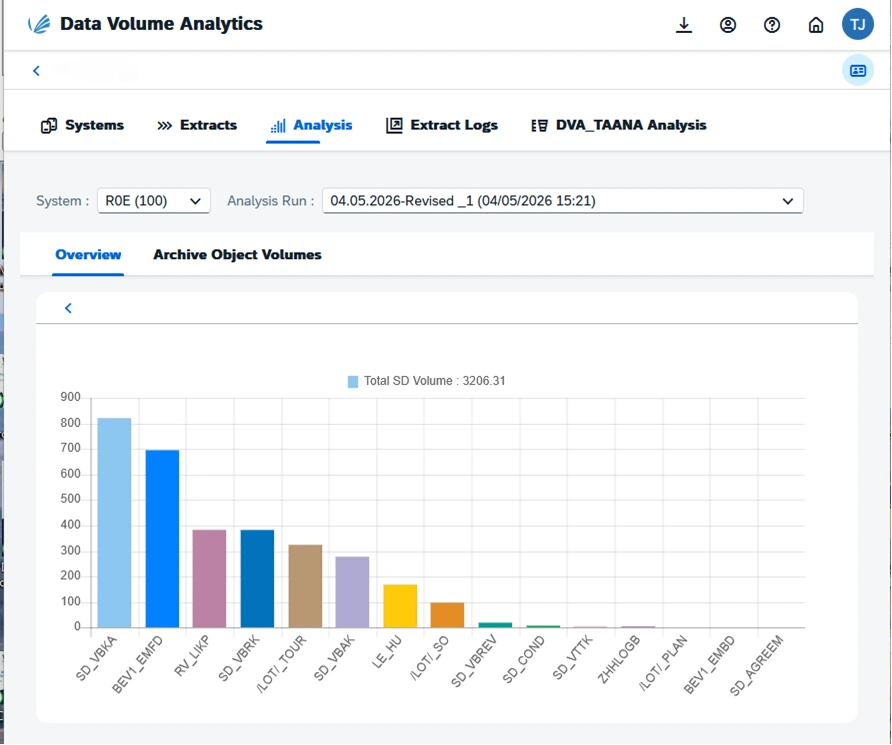
Archiving these objects can reduce table sizes by more than 50%, enabling reports to run much faster and shrinking the database footprint.
The Archiving Sessions Cockpit (ASC) then automates the process: configure the biggest archiving objects once, and the ASC runs data archiving continuously without human intervention.
As a result, you see volume reductions within weeks, and a leaner system also speeds up upgrades, S/4HANA conversions and cloud migrations. The Archiving Sessions Cockpit turns data archiving into a controlled, continuously running process that archives eligible data according to retention rules and within the windows when archiving is allowed. For SAP Basis teams, that means automating repetitive, error-prone manual tasks and freeing time for value-creating work. The premise is simple: don’t wait for SAP tables to become unmanageable before acting.
Pain point 2: Too much repetitive manual monitoring and administration
SAP Basis teams already spend a significant part of their day monitoring system health and responding to operational issues. Depending on the landscape, this can mean regularly checking transactions such as SM21 for system logs, SM37 for background jobs, ST22 for ABAP dumps, ST02 for buffer performance, ST03 for workload analysis and SM12 for lock entries. In larger environments, administrators may need to repeat these checks across multiple systems and instances.
Manual SAP data archiving adds more to a plate that is already full. Before archiving, teams create the appropriate variants, configure and schedule jobs, and ensure the selected data meets the required criteria. Once the process starts, the work does not end: Basis teams monitor the sessions, check job logs and spool results, identify errors, restart failed jobs and verify that the process has completed successfully. This work is necessary but provides little professional satisfaction, and it pulls Basis teams away from strategic activities such as architecture improvements, preventive maintenance and performance optimisation.
There is also a less visible risk: archiving knowledge is not always broadly distributed within the organisation. In many environments, only a small number of Basis or DBA specialists know the precise sequence required to configure, execute, troubleshoot and restart archiving jobs. When those individuals move teams, leave or simply become unavailable, that operational knowledge can disappear with them, archiving slows down or stalls, and data volumes keep increasing.
Repetition also creates room for error. A poorly configured variant can archive the wrong selection of data or fail to capture the intended records, and incorrect scheduling can leave archiving processes unfinished. The more frequently these activities are repeated across multiple archiving objects, systems and cycles, the greater the opportunity for configuration or monitoring errors.
How ASC solves the problem
TJC Group developed the Archiving Sessions Cockpit in response to customer demand for a more efficient approach to manual data archiving. The ASC automates archiving sessions based on predefined parameters, helping Basis teams reduce recurring manual effort and the risk of configuration errors.
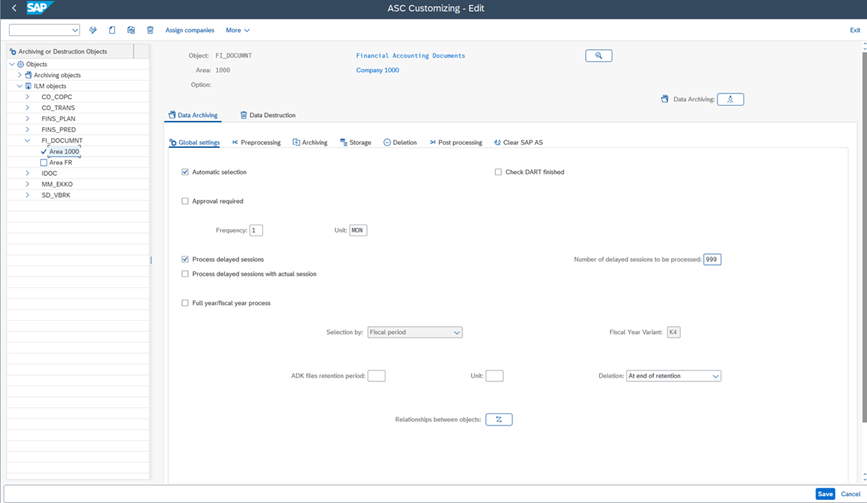
Once the functional configuration and object customising are done, there is often very little interaction required: ASC runs consistently in the background, creating variants and picking up interrupted jobs, you might even forget it is there. By enabling ongoing archiving rather than treating it as a one-off activity, ASC helps organisations:
- Control ongoing database growth
- Reduce repetitive Basis administration
- Maintain a smaller data footprint
- Support SAP S/4HANA migration planning
- Free internal resources for higher-value activities
Pain point 3: Archiving job failures and error-correction nightmares
With manual archiving, you have to keep an eye on the jobs. You launch a job before going to bed and check the progress in the morning; if there are errors or interruptions, you have to run the jobs again. It is not an efficient process, and it takes time away from strategic work.
Archiving also typically runs during limited maintenance windows, overnight or at weekends, when business activity is lower. If a job runs for several hours and then fails because of an error, that entire window can be lost. The problem does not end there: Basis teams may need to investigate the job logs, determine the cause, correct the underlying issue and restart the process, which can involve additional data checks or reprocessing.
The situation becomes more challenging when organisations rely on custom archiving scripts or unsupported scheduling mechanisms. Such scripts can introduce dependencies that are difficult to maintain and may require changes following SAP upgrades, patches or system changes, and failed jobs can generate incidents that place additional pressure on on-call teams.
How ASC solves the problem
The Archiving Sessions Cockpit is designed to keep SAP data archiving running reliably, even when Basis teams are not actively monitoring every session. It watches the jobs; if it spots errors, it corrects them and resets, so Basis teams save time because issues are addressed immediately.
- Optimises limited archiving windows: teams define how many jobs run in parallel. For example, with 20 archiving objects and only three allowed to run simultaneously, ASC manages the sequence and continues processing the remaining objects. ASC can also restrict archiving to running at certain times, for example 11 p.m. to 6 a.m. daily.
- Prevents unsafe executions: ASC performs checks before archiving begins and will not start a run when required conditions, such as residence times, have not been properly defined.
- Checks configuration changes: customising checks help identify changes to parameters such as archiving frequency or residence time, and ASC can prevent a session from proceeding until the change has been confirmed, helping avoid gaps or duplicate archiving.
- Provides a supported alternative to custom scripts: unlike fragile, customer-specific scripts, ASC is an SAP-certified solution with its own namespace, providing a maintained and supported approach to archiving session management.
The result: Basis teams spend less time firefighting failed archiving jobs and can make better use of the limited windows available for SAP data archiving. Reach to us to request a free initial assessment that will highlight where the quick wins are and how it pays off both in time savings for you and financial savings for the Management.
Pain point 4: Backup, refresh, and maintenance windows under pressure
Archiving is typically permitted outside business hours, at nights and weekends, and managing all these interruptions manually is time-consuming. Consider an environment where archiving is permitted only from midnight until 6:00 a.m.; at 6:01 a.m. the process must stop because production activity takes priority. Someone has to ensure the sessions are stopped correctly and, critically, restarted when the next permitted window opens, and the same applies when a run fails because of a temporary technical condition. At a small scale this may seem manageable, but at a larger scale it becomes a persistent and demanding monitoring requirement.
Larger databases mean longer technical operations: backups, system copies, refreshes, upgrades and migrations all take longer as volumes increase. In some environments, backups can extend beyond 12 hours, or a system copy can consume an entire weekend.
- Every unnecessary gigabyte adds to the workload: larger volumes increase the time and resources required to move, copy, back up and restore SAP systems, extending maintenance and downtime windows.
- Limited windows put pressure on SAP teams: when critical activities can only run overnight or at weekends, longer processing times translate into more night and weekend work, on-call pressure and reduced flexibility.
- Long refresh and cloning cycles affect wider IT projects: slow system copies and refreshes can delay development, testing and project activities, particularly when teams depend on refreshed SAP environments.
The larger the database, the more time and resources it takes to maintain, copy and move. Controlling data volume therefore reduces not only infrastructure requirements but also the time pressure on critical maintenance windows.
How ASC solves the problem
Customise once, run continuously. With the ASC, you can customise data archiving extensively, and archiving resumes automatically once the prerequisites are met. For example, you can archive accounting documents per company code, by sales organisation or per plant.
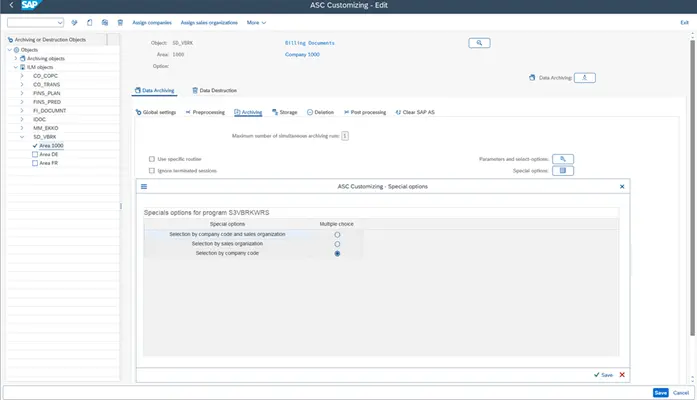
Areas and options provide a granular framework for defining and executing archiving sessions. Together, they determine:
- The frequency of execution
- Residence time in the database
- Retention time in the archive
- Applicable information structures
- The document types to include or exclude for a specific ILM object
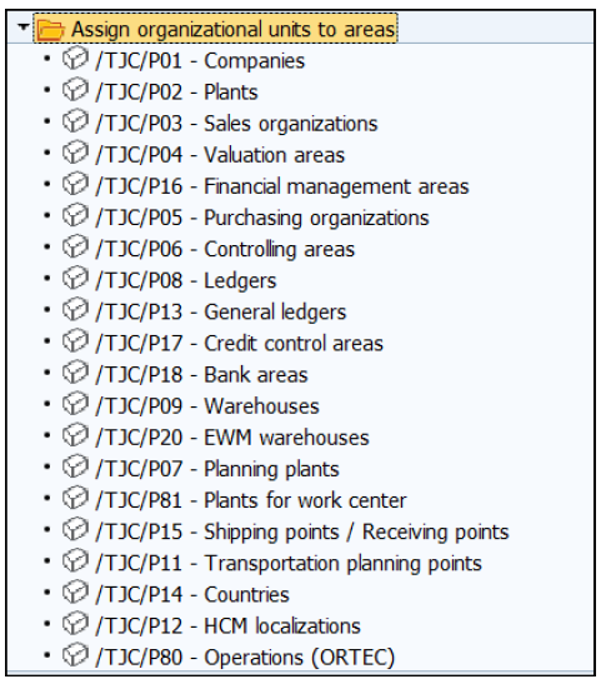
This approach is particularly valuable in international or multi-company environments, where retention requirements may vary significantly by organisational unit or document category. By structuring archiving logic through areas and options, organisations can avoid selecting an excessive number of objects and reduce overall programme runtime while maintaining precise compliance control.
Customer example: adapting archiving to operational priorities
A good example of this flexibility comes from UK Power Networks (UKPN), whose archiving schedule has to account for exceptional operational circumstances such as storm warnings. During severe weather, UKPN needs to prioritise system capacity for responding to potential electricity outages, handling increased emergency calls, coordinating field operations and managing the logistics of supplying parts for repairs. Running archiving during these periods could compete with resources needed for critical operational activities.
With ASC, UKPN can define a storm warning as a period during which archiving should not run. Archiving is paused for the specified period and resumes automatically once the restriction has passed, without Basis teams having to restart the programme manually.
This shows how archiving can be aligned not only with technical maintenance windows but also with real-world business and operational events. The value of automation is not simply keeping archiving running; it is knowing when it should stop and ensuring it starts again when the business is ready to do so.
Pain point 5: HANA memory cost pressure and uncontrolled data growth
For SAP HANA environments, data growth is not simply a storage challenge. HANA is a powerful database, but it does rely heavily on memory for processing, which translates directly into higher infrastructure and licensing costs. Statistics estimate a database growth of 10–15% per year. This can become quite an issue in large SAP estates, particularly when high-volume transactional data remains in the production system longer than necessary.
The financial impact becomes more pronounced as organisations scale their HANA environments. HANA infrastructure is typically sized according to defined capacity tiers, which means even a relatively small increase in memory requirements can push an organisation into a larger and more expensive tier. This makes uncontrolled data growth a financial risk as well as a technical one: organisations expand hardware or cloud capacity, or upgrade infrastructure tiers, earlier than planned simply to accommodate data that may no longer need to remain in the active database. The challenge is particularly relevant in SAP S/4HANA, where ACDOCA contributes significantly to overall database growth as transaction volumes increase.
Customer example: how quickly automation pays off
Automation of data archiving jobs in SAP also shortens the time it takes to see a return. Diversey, a global cleaning and hygiene products business now part of the Solenis Group, began its data archiving programme after an initial assessment and set of recommendations from TJC Group. The company started by handling the more straightforward archiving internally and manually, but soon found it time-consuming and a drain on IT staff who were needed on other projects.
Diversey then implemented TJC Group’s ASC to automate the process. Automated archiving proved far easier to run and delivered the desired volume savings more quickly than manual archiving had, while keeping future data growth under control, an important foundation for the company’s planned move to SAP S/4HANA.
Hear the full story: watch Diversey’s presentation at UKISUG CONNECT 2023.
How ASC solves the problem
- Start automated data archiving in S/4HANA as early as possible so that data growth is kept under control from the outset.
- Regular archiving keeps the database size to a minimum, keeping HANA memory costs under control and allowing the organisation to remain on the lowest memory tier for as long as possible.
- The ASC automates archiving in S/4HANA, maximising data reduction and helping the company stay within its contracted tier (“T-shirt size”).
- TJC Group’s SAP Archiving ROI Calculator can help organisations estimate how much they could save on HANA memory costs. Play with the SAP Archiving ROI Calculator.
Pain point 6: No monitoring or visibility across archiving sessions
Traditional SAP archiving processes offer limited centralised visibility across multiple ongoing archiving sessions. Basis teams need a clear view of which archiving sessions are running, which have completed, where failures have occurred, how much data has been archived and whether data volumes are actually being reduced. As the number of archiving objects and SAP systems increases, tracking this manually becomes increasingly difficult:
- Archiving documentation and data retrieval suffer, because archiving notes and related information may be recorded inconsistently or left incomplete.
- It becomes difficult to establish where specific business data has been stored.
- If a user needs to retrieve a historical invoice or document, they may have to search across multiple archive files and verify them individually.
Without clear visibility across archiving sessions, it is hard to assess whether the strategy is delivering the expected results. Basis teams may know that jobs are running but lack a clear picture of which archiving objects are contributing the greatest volume reduction, how database growth is changing over time, or whether archiving is keeping pace with new data generation.
How ASC solves the problem
For organisations managing complex SAP landscapes, centralised monitoring provides more than operational convenience: it creates the visibility needed to measure archiving effectiveness, identify trends and make informed decisions about ongoing data volume management. A centralised hub oversees all archiving and ILM across multiple SAP systems, and that is exactly what the ASC on BTP offers to SAP Basis and administration teams.
- Control and monitor all archiving jobs across multiple SAP systems (different SAP systems, BW, CRM, SRM and others) from a single interface.
- Prepare reports that show archiving ratios, completed sessions and data volume trends.
- Generate automatic archiving notes with consistent, structured information (for example, “company code 1000, January 2015”), so users know exactly which archive files to open or skip, critical for efficient data retrieval and for DART extract generation.
How the Archiving Sessions Cockpit (ASC) solves these problems
The Archiving Sessions Cockpit transforms SAP data archiving from a repetitive, manually managed task into a controlled and automated data management process. Instead of requiring Basis teams to continuously configure, monitor and restart individual jobs, ASC manages archiving sessions according to predefined technical and business rules such as residence times, archiving objects, session dependencies, maintenance windows and business constraints.
It also works across SAP ECC and SAP S/4HANA, and can also automate archiving in older SAP environments where SAP ILM is not supported. The value is not simply in running more archiving jobs; it is in making SAP data archiving a continuous, measurable and governed process.
Why a job scheduler isn’t enough
Some teams already work with a job scheduler, either SAP standard job scheduling tool, or a third-party one. These run jobs at set times, but scheduling is not the same as automating archiving. A scheduler fires a job; it does not have archiving or business logic. It does not create the variants, understand residence times and ILM objects, verify that the configuration is safe before a run, manage archiving-specific dependencies, stop and resume cleanly around maintenance windows, or recover from archiving-specific failures.
ASC is built specifically for SAP data archiving and manages the whole session lifecycle, not just the start time. And unlike fragile custom scripts, it is an SAP-certified solution with its own namespace, maintained and supported across SAP releases.
Pain point | How ASC solves it |
|
System performance degradation |
Reduces the largest tables and runs continuous, automated archiving |
|
Repetitive manual work |
Configure once, run continuously, “set and forget” |
|
Job failures and error correction |
Automatic error recovery and optimised archiving windows |
|
Backup, refresh and maintenance pressure |
Smaller databases mean shorter windows |
|
HANA memory cost pressure |
Maximises data reduction; helps stay within the contracted tier |
|
No monitoring or visibility |
Centralised cockpit with reporting and archiving notes |
Watch the comparison between ASC and third-party job schedulers.
Conclusion
You are not alone, and there is a solution: turn archiving into an automated, safe and compliant process. The real value of SAP data archiving comes from continuity. Archiving once may reduce the database temporarily, but without an ongoing strategy new data will keep accumulating. With ASC, organisations can establish recurring archiving processes that work around their technical and business constraints, so Basis teams spend less time watching individual jobs and more time analysing data growth, identifying new archiving opportunities and improving the overall SAP environment.
With more than 25 years of data archiving experience, TJC Group helps organisations assess their data volumes, identify quick wins for S/4HANA migration and develop a practical roadmap for ongoing SAP data management. Request an initial assessment, and our SAP consultants will identify your biggest tables, recommend the highest-impact archiving objects and outline a clear roadmap to get your data volumes under control.
FAQ's
Q1. Why is manual SAP data archiving time-consuming?
Answer:
Manual archiving requires Basis teams to create variants, schedule jobs, monitor sessions, troubleshoot errors, restart failed jobs and manage archiving within limited maintenance windows. Repeating these activities across multiple archiving objects and systems can create a significant operational workload.
Q2. How can SAP data archiving affect SAP Basis operations?
Answer:
Manual archiving can add to the workload of SAP Basis teams, particularly when jobs fail or need to be monitored outside business hours. It can also compete with other activities such as performance optimisation, system maintenance and automation initiatives.
Q3. What happens when a manual SAP archiving job fails?
Answer:
It may require administrators to investigate the error, correct the underlying issue and restart the archiving process. If the failure occurs during a limited archiving window, valuable processing time can also be lost.
Q4. Can SAP data archiving be automated?
Answer:
Yes. Archiving activities can be automated to reduce repetitive manual intervention. TJC Group’s Archiving Sessions Cockpit (ASC) automates archiving sessions, monitors jobs and helps manage archiving within predefined parameters.
Q5. What is the Archiving Sessions Cockpit?
Answer:
The ASC is an SAP-certified solution from TJC Group that automates SAP data archiving sessions. It creates variants, schedules and runs archiving according to predefined technical and business rules, manages parallel jobs within maintenance windows, recovers from errors and provides centralised monitoring across SAP systems. The ASC has its own namespace in SAP.
Q6. How does automated data archiving help SAP Basis teams?
Answer:
It removes most of the repetitive manual effort, variant creation, scheduling, monitoring, error correction and restarts, so archiving runs continuously and reliably. Basis teams keep databases leaner, protect HANA memory costs, reduce night and weekend work, and free time for higher-value activities