



Author: TJC Group Content team
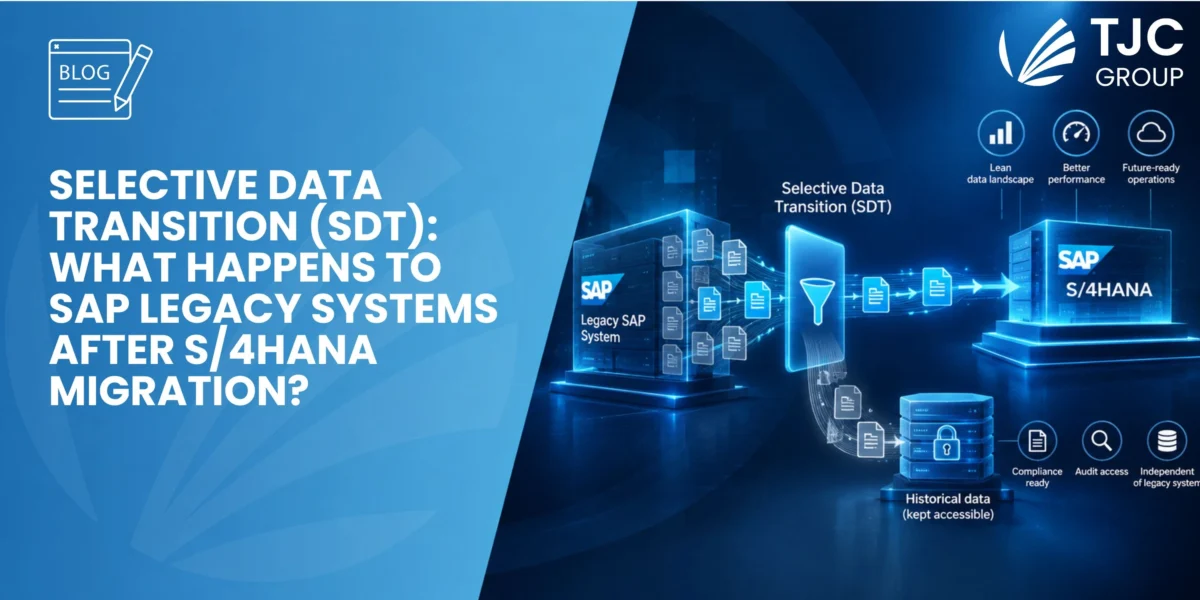
So, you have chosen Selective Data Transition (SDT) for your S/4HANA migration and have selected the information you want to move forward. But what happens to the data and legacy systems left behind? Several options are presented here: keep the SAP ECC system running, freeze the system in a virtual environment, extract all the data and store it in external repositories, and decommission the legacy system.
This article explores all the options for managing legacy SAP ECC systems after an SDT migration and explains why the retirement of the legacy system should be considered from the start of the S/4HANA program, not after go-live.
Table of contents
- Introduction: Selective Data Transition (SDT) migration in a few words
- Why SDT creates a legacy-data challenge
- What happens to the legacy ECC system after SDT migration?
- Why decommissioning should be planned day one
- Plan SDT migration and decommissioning together
- How to preserve access to historical data after SAP ECC is retired
- How ELSA provides centralised access to historic data
- Conclusion and key takeaways
Introduction: Selective Data Transition (SDT) migration in a few words
Selective Data Transition sits between a system conversion and a completely new S/4HANA implementation. It enables organisations to preserve what works, introduce targeted change, consolidate where needed, and decide which data and historical information they want to move forward.
A key decision is therefore not merely “Which technology should we use?”, but “How much change do we need to generate business value from the S/4HANA move?”
From a data-management perspective, organisations can select the relevant master data, open transactions, and historical information they want to carry forward rather than automatically moving the entire ECC database.
In simple terms, an SDT project would normally follow these phases:
- Create a shell copy of ECC.
- Move or upgrade the shell to the desired S/4HANA environment.
- Implement the targeted changes required by the business.
- Migrate and convert the required data.
The SAP production ECC system can remain untouched while much of this preparation takes place in parallel.
In general, SDT is better suited to organisations that want to introduce targeted change rather than completely reimagine large areas of the business. If transformation is widespread across most of the organisation, a Greenfield approach may be a better fit.
There are different ways to execute an SDT programme, including lean, full and hybrid approaches. However, regardless of the exact route chosen, an important data question remains: what happens to the information and systems that are not taken forward?
To find out more about S/4hana migration paths, download this ebook written in collaboration with migration experts from XMATERIA

Why SDT creates a legacy-data challenge
One benefit of Selective Data Transition is that organisations do not have to carry all their historical ECC data into the new S/4HANA environment.
Older fiscal periods, inactive organisational units, redundant company codes or historical transactions may not need to occupy space in the new operational system.
However, reducing the migration footprint solves only one part of the problem. Historical data may still be required for:
- tax and audit purposes;
- regulatory and legal requirements;
- historical reporting;
- investigations or litigation;
- data privacy and retention obligations;
- occasional business enquiries.
Organisations therefore have to make two related decisions during an SDT programme:
- What should move to S/4HANA?
- What should happen to the information that stays behind?
Ideally, you should be made together.
Data Archiving and deletion are part of the answer, but not all of it
It is worth noting that SAP data archiving and data deletion address part of this challenge. Archiving moves eligible inactive or rarely accessed information out of the live database while preserving access to it, which can reduce the volume that needs to be processed during migration. Deletion permanently removes information that no longer has legal, regulatory, or business value, but it must follow the organisation’s applicable retention rules and data-privacy requirements.
Neither approach, however, fully resolves what happens to the legacy ECC system itself after migration. Even after organisations delete eligible data and archive dormant information, they may still have years of historical records tied to the ECC environment. If that information must remain available, simply switching off the legacy system is not an option. At the same time, keeping the entire legacy application running purely to access previous records introduces significant cost, security, and compliance considerations.
If you are still determining what information belongs in S/4HANA, our article “SAP ECC to S/4HANA: What data should be migrated?” provides a detailed framework for deciding what should be migrated, archived, deleted, or retained outside the live S/4HANA environment.
What happens to the legacy ECC system after SDT migration?
Once the organisation has decided what will migrate to S/4HANA, it needs a strategy for the legacy system and the historical data that remains within it.
Overall, there are four broad possibilities.
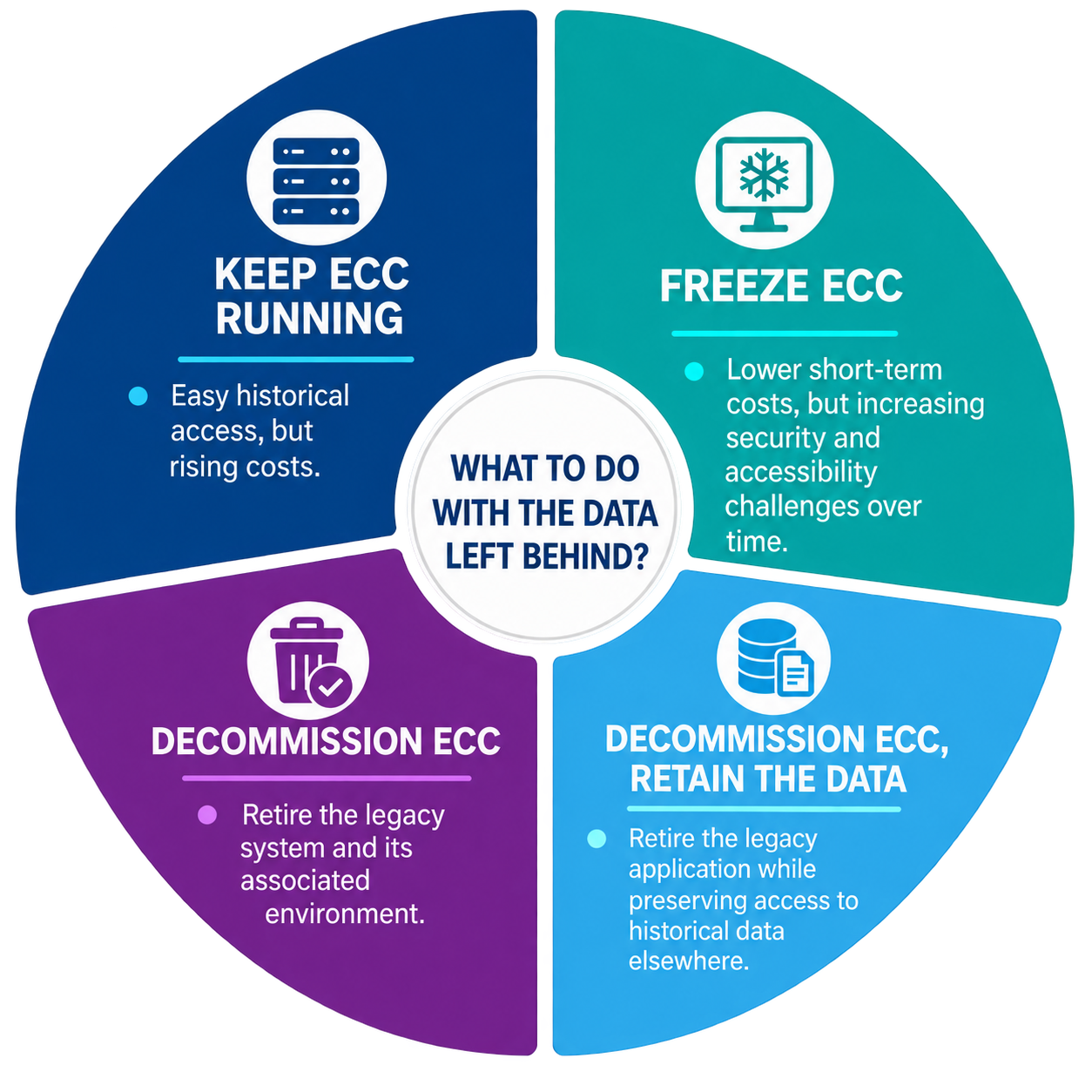
1. Keep ECC running in read-only mode
Historical data remains readily accessible, but so do the costs associated with keeping the system operational. Expenses for infrastructure, maintenance, licenses, and specialist support can keep building up even after SAP ECC stops being the primary business system.
These costs can be substantial. For example, a Forrester study modelled a large global organisation with approximately $7 million in annual infrastructure and maintenance costs for its legacy on-premises SAP ECC environment. For a deeper look at the financial burden of maintaining legacy systems, see our article on the hidden costs of legacy systems.
These costs may become even harder to justify as ECC reaches the end of mainstream maintenance. SAP’s mainstream maintenance for Business Suite 7 runs until the end of 2027, with optional extended maintenance available afterward at an additional premium. The actual cost will, of course, vary significantly depending on the size of the organisation, its SAP landscape, infrastructure, licensing model, and whether ECC remains fully operational or is maintained primarily for historical access.
2. Preserve or freeze ECC in a virtual environment
Freezing ECC in virtual environment may appear cost-effective in the short term, particularly if access is infrequent. However, it can create challenges over time.
Booting up the environment whenever historical information is required may be time-consuming. An aging environment may also become harder to maintain and secure.
Access can become particularly problematic if the SAP or IT specialists who originally maintained the legacy system leave the organisation. Over time, the knowledge required to navigate the old environment and retrieve information may gradually disappear.
3. Extract data and documents into external or tax archives
One approach is to extract historical data and documents from ECC in flat files (such as AIS format) and store them in external files or repositories. While this may satisfy specific retention requirements, it comes with a significant limitation: accessibility.
If a business user later needs historical information for tax, audit, reporting, or any other business purpose, retrieving and interpreting technical extracts or flat files can be extremely difficult without dedicated IT support. In practice, some form of audit or visualisation tool will be needed to retrieve, read, and make sense of that data.
For instance, a legacy system application such as ELSA by TJC Group provides straightforward access to legacy data through an intuitive dashboard, where business users can build dynamic reports, view historical records, and create custom transactions, all without relying on IT intervention.
Consider a practical scenario: your organisation has imported four years of legacy data into S/4HANA. A business user now requires access to data from five years ago, but that data was only stored as a flat file in an external archive. To access and work with that information, the user will need a dedicated tool to visualise the data and potentially generate custom reports. This is precisely the kind of challenge that a legacy system application such as ELSA is designed to solve.
The issue, therefore, is not simply whether the information has been preserved. Organisations must also consider how easily the retained data can be found, understood, and retrieved years after it was archived.
4. Decommission SAP ECC while retaining access to historical information
System Decommissioning takes a different approach. Instead of preserving the entire legacy application simply to maintain access to its contents, organisations can retire the obsolete application while preserving the historical information that must remain available elsewhere.
This enables organisations to separate two things that are often treated as one: the legacy application and the legacy information it contains.
The system itself may no longer be required for daily business activity, while its historical data, documents and reports may still have value for many years.
📖 For a broader overview of legacy system decommissioning in the context of S/4HANA, see our article: All about legacy system decommissioning in S/4HANA migration.
Why decommissioning should be planned day one
A legacy-system decommissioning project is often treated as something to address after the S/4HANA migration has finished.
That approach can create unnecessary work.
Once S/4HANA goes live, the project team is naturally focused on stabilisation and returning to normal business activity. Starting another project at that point to determine what should happen to ECC means reopening many of the same questions:
- What information do we still need?
- What can be deleted?
- What has to be retained?
- Who needs access?
- How should historical information be extracted?
- When can the old infrastructure finally be switched off?
For this reason, decommissioning is better considered at the beginning of the S/4HANA transformation. When organisations analyse what data will move to S/4HANA, they should also plan what happens to the data that will not. This creates a more holistic data strategy and avoids tagging another major decision-making process onto the end of the migration project.
It can also extend beyond the primary SAP ECC system. Organisations may have satellite applications or other legacy systems connected to ECC that could, potentially, be reviewed and retired as part of the same wider transformation.
Plan SDT migration and decommissioning together
An SDT strategy and a legacy-system strategy address different questions, but they should be planned in tandem.
| SDT migration questions | Legacy decommissioning questions |
| Which historical periods and datasets should be included in the S/4HANA migration? | Which historical SAP information must remain available after ECC is retired? |
| What should the SDT migration scope include? | How long must legacy information be retained? |
| Which business processes and organisational units should move? | Which legacy information may eventually become eligible for deletion? |
| Which business, reporting, and compliance requirements should shape the SDT design? | Which tax, audit, legal, and data-privacy requirements apply to retained legacy data? |
| How will selected data be migrated and validated? | How will users access historical SAP information after decommissioning? |
| When is the S/4HANA environment ready for go-live? | When can the legacy application and infrastructure safely be switched off? |
Thinking about both workstreams early helps organisations avoid treating legacy data as an unresolved consequence of the S/4HANA project.
How to preserve access to historical data after SAP ECC is retired
The goal is not simply to preserve legacy data. The goal is to ensure that information created years ago in a different ERP system can be accessed easily today.
Consider a simple example. An auditor requests an invoice from X years ago. That invoice was migrated to S/4HANA. What happens next? Make sure you have a legacy system application that provides secure access to historical data.
When historical information is spread across multiple legacy environments, finding the required record can become difficult and time-consuming.
The challenge may increase over time as the SAP specialists who managed those systems leave the organisation and knowledge of how to retrieve information from the old systems is gradually lost.
This is where centralised legacy data access becomes valuable.
Instead of requiring business users to return to individual legacy systems whenever they need an old invoice, report or transaction, the organisation can preserve the required information in an environment designed specifically for historical access.
The key is to plan how non-migrated data will be accessed when deciding what to move to S/4HANA.
How ELSA provides centralised access to historic data
A dedicated legacy-data environment is one way to separate historical-data access from the legacy infrastructure that originally created the information.
TJC Group’s Enterprise Legacy System Application (ELSA) has been developed for this purpose.
ELSA provides centralised access to legacy data, documents, reports and historical transactions after the original system has been retired. Users can access information from multiple decommissioned legacy systems through a single environment, with user authorisations and data-privacy controls applied as required.
The objective is not to reproduce the original ECC system indefinitely. It is to preserve access to the information that remains valuable without requiring business users to navigate or maintain the legacy application itself.
This can be particularly useful for finance, tax and audit users who may need to retrieve historical information years after migration but may no longer be familiar with the original SAP GUI transactions.
The decommissioning process with ELSA
The process to decommission a legacy system with ELSA consists of four key steps:
- Extract the full database from the legacy system. This covers 100% of the information, including tables, documents, attachments, and reports. Nothing is left behind.
- Upload the extracted information into the storage of your choice. Select a MySQL database hosted on AWS, Azure, Oracle, or on-premise infrastructure, along with file storage or blob storage on a hyperscaler (AWS, Azure, or Google Cloud).
- Load the relevant data into ELSA. You can choose to upload only the data you need immediately; for example, just two years of information. If data from four years ago is required at a later stage, it can be easily loaded on demand.
- Access historical data through the ELSA workspace. End users can view all decommissioned systems (both SAP and non-SAP) through the Legacy Systems Directory. Each legacy system is defined as a workspace, allowing users to access any of them directly without having to log into each system separately.
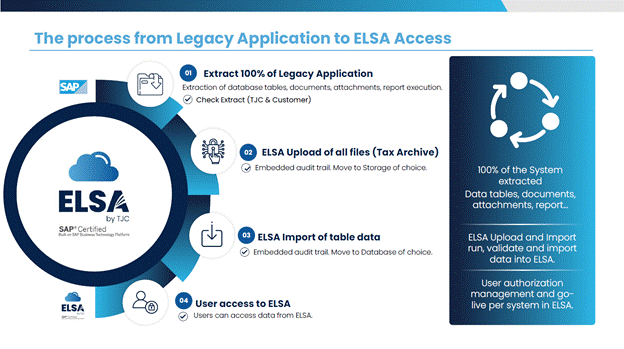
Figure 1. The process of system decommissioning with ELSA
A real-world legacy systems decommissioning case study
A TJC Group customer provides a practical example. A global leader in the design and manufacture of innovative commercial ceiling, suspension system and wall solutions used ELSA as part of its legacy-system retirement strategy following S/4HANA migration.
By retiring the legacy SAP ECC environment while retaining access to the historical information it required, the organisation avoided more than $250,000 per year in SAP and Oracle license and maintenance costs.
Conclusion and key takeaways
Selective Data Transition is not simply about moving a selected portion of SAP ECC data into S/4HANA. It is about deciding where the organisation wants to introduce change, where it wants to preserve previous SAP investment and which information genuinely needs to form part of the future operational environment.
But deciding what moves is only half of the data strategy. Information left behind cannot simply be ignored. Some records may be archived, some may eventually be deleted, while other historical information must remain accessible for business, tax, audit, legal or regulatory purposes.
Keeping ECC running or preserving it in a frozen environment may provide short-term access to those records. Still, maintenance, security, knowledge and accessibility challenges can continue long after S/4HANA go-live. Rtiring the legacy system with a legacy system application, such as ELSA, is the safest path. It ensures legacy data can be accessed in a secure and compliant way.
Finally, legacy system decommissioning should be planned from the start of an SDT program, not treated as a separate exercise after migration. By defining both strategies together, organisations can move the right information to S/4HANA, preserve access to the historical information and establish a clear path to retiring the legacy infrastructure.
TJC Group supports organisations across this lifecycle, from assessing SAP data volumes, archiving eligible information before migration to planning legacy-data access and the retirement of SAP ECC systems. Where a legacy environment is no longer required for operational processing, ELSA can provide a controlled way to preserve access to the information that still needs to remain available.
FAQs
Q1. Is legacy-system decommissioning the same as data deletion or data archiving?
Answer:
No. Decommissioning retires an obsolete application, whereas data deletion permanently removes information. Data Archiving is a way to remove historical data from the live database, while retaining access to data as archive files. System decommissioning, on the other hand, means retiring an entire legacy system, for example shutting down an SAP ECC system after migrating to S/4HANA. Before the old system can be switched off, an organisation normally needs to ensure that historical information remains available for legal, tax, audit, and business purposes.
Q2. What should organisations consider during an SDT migration from a data-management perspective?
Answer:
Organisations should determine what information needs to be migrated, archived, deleted or retained outside S/4HANA.
They should also consider business reporting requirements, data dependencies, retention rules, GDPR and data-privacy obligations, tax and audit requirements, and how to access historical information after migration. Therefore, the future of the legacy system and access to legacy data should be addressed during the migration process, not afterwards.
Q3. How can non-migrated legacy data remain compliant after S/4HANA migration?
Answer:
Historical information that remains outside S/4HANA should still be managed according to the organisation’s applicable retention, tax, legal and data-privacy requirements.
The organisation should consider how long information must be retained, who is authorised to access it, how access is recorded and when the information may eventually become eligible for deletion.
Q4. What happens if organisations do not decommission their legacy SAP systems?
Answer:
Keeping legacy SAP systems operational after an S/4HANA migration can result in continued maintenance, licence, infrastructure and specialist-support costs.
Over time, ageing technology may also create security and compliance challenges, while accessing historical information can become more difficult as technical expertise and knowledge of the legacy environment decline.
Q5. Should historical data be migrated to S/4HANA or left outside the new environment?
Answer:
There is no fixed number of years of historical data that every organisation should migrate.
The scope should be based on business requirements, reporting needs, regulatory obligations, dependencies between data, and the chosen migration approach.
Information that does not need to remain in the live S/4HANA environment may be suitable for archiving or another legacy-data retention strategy.
Q6. How can business users access historical SAP information after ECC has been retired?
Answer:
Historical SAP information can remain accessible through a dedicated legacy-data environment.
Authorised users can retrieve historical records for business, tax, audit or compliance purposes without keeping the original ECC application operational. Solutions such as ELSA can provide centralised access to information from multiple decommissioned legacy systems.